Tag: AI keyword research free

  • How to Use AI for Keyword Research Free: A Practical Guide
    How to Use AI for Keyword Research Free: A Practical Guide

    Free Keywords Research in 2026: The Truth

    You don’t need to use paid tools to find keywords that rank. AI has changed the equation completely. If you know the tools to use and how to prompt them properly, you can now do AI keyword research that would have cost hundreds of dollars per month in 2020 for free.

    If you’re a blogger, content marketer, or small business owner and you want results—without paying for a Semrush subscription—this guide is for you.

    What AI Really Does in Keyword Research

    AI doesn’t replace keyword data. It understands it. How it works: You take free data sources—Google Search Console, Google Autocomplete, Reddit, and YouTube—and you feed that raw material into an AI model to look for patterns, clusters, and gaps you would miss manually.

    That two-step process is what distinguishes people who get results from people who just produce lists of keywords.

    Best Free AI Tools for Keyword Research

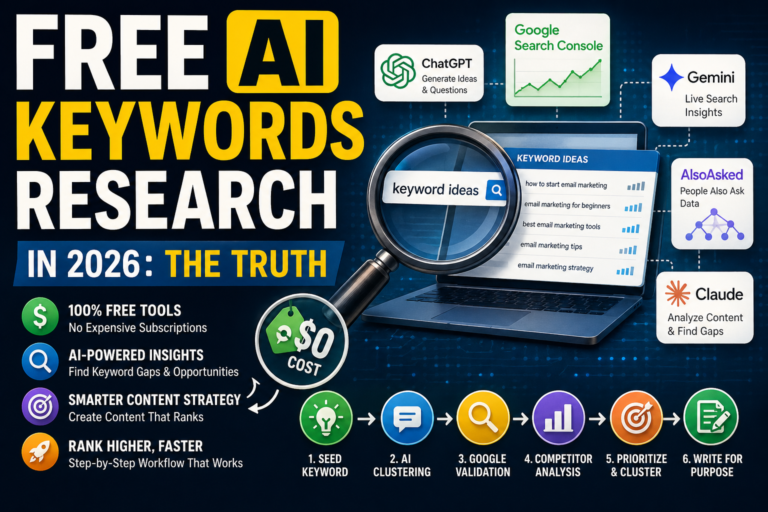
    Best free AI tools for keyword research in 2026 including ChatGPT, Google Search Console, Gemini, AlsoAsked, and Claude with features

    1. ChatGPT (Free plan)

    ChatGPT is the most underused keyword research tool available at no cost. Most people just ask it generic questions. That is no way to go about it.

    Use it to create semantic clusters of keywords. Seed a topic and ask for 20 long-tail questions your target audience is actively searching for. Then sort by intent. Informational, Commercial, or Transactional. No paid tools needed.

    Best prompt: “Create 20 long-tail keyword questions a beginner blogger would search for about [your topic]. Categorize by search intent.”

    Limitation: ChatGPT doesn’t have live search volume data. Use it for ideation and clustering, not for validating volume.

    2. Google Search Console & AI Analysis

    Google Search Console shows you real queries your site is already ranking for—free, straight from Google. Export that data, paste it into ChatGPT or Claude, and ask it to find keyword clusters, identify content gaps, and suggest which pages to optimize first.

    This is a free pairing and is based on actual rankings data, not third-party estimates.

    Limitation: Only works if your site already has traffic. New sites need a different beginning.

    3. Gemini (Google’s free AI)

    Gemini has live Google Search integrated. Just ask it what people are searching around your topic, and it pulls current autocomplete and related search data directly. A live connection is a big plus over static keyword databases in trend-sensitive sectors like finance, tech, and health.

    Best use case: Validating if a keyword is trending up or dying before you write about it.

    Limitation: Gemini does not provide search volume numbers. The output should be treated as a guideline, but not as a final answer.

    4. AlsoAsked (Free Plan)

    AlsoAsked turns Google’s “People Also Ask” data into a visual tree. The free plan has a limited number of searches per day – enough for focused research sessions. Dump the output into ChatGPT. Group those questions by content pillar and build a topic cluster map without spending money on a dedicated SEO tool.

    Limitations: Free plan capped at X searches per day. Start with your most important topics.

    5. Claude (Gratis)

    Claude handles large inputs of text pretty well, so it’s good for one particular task: paste in a competitor’s article, ask it to extract every implicit keyword and subtopic it covers, then ask it what the article missed. That list of gaps becomes your content angle.

    Limitation: No live search volume as in the case of ChatGPT. Check against Google AutoComplete.

    Free AI Keyword Research Workflow – Step by Step

    Step-by-step free AI keyword research workflow showing seed keyword selection, AI question generation, Google validation, competition analysis, clustering, and content optimization process

    Do this exact process to go from zero to a validated keyword list without spending a dime:

    Step 1 — Seed Keyword: Pick a broad subject that is related to your niche. For example, email marketing for beginners.

    Step 2 — Ask questions Paste the seed into ChatGPT and ask for 30 long-tail keyword questions grouped by intent.

    Step 3—Validate with Google: Type the most promising keywords into Google and check Autocomplete, People Also Ask, and Related Searches at the bottom. These are real searches, not AI guesses.

    Step 4—Analyze competition: Search your target keyword. If the first page is Forbes, HubSpot, or Semrush, move on. Target results you can beat that have lower domain authority or thin content.

    Step 5 – Cluster and Prioritize: That’s a lot to process all at once, isn’t it? Ask it to cluster keywords into content clusters and suggest which one to write first based on commercial intent and probable competition level.

    6. Write for a purpose: Include your focus keyword in the title, first paragraph, and at least one H2. Don’t publish until you’ve checked the word count, subtopics, and questions covered against the depth of the top Google results for the topic.

    What Free AI Keyword Research Won’t Do

    Infographic explaining what free AI keyword research tools cannot do, including lack of search volume data, keyword difficulty scores, ranking tracking, and need for real data validation

    Be realistic about the limits. Free AI tools are not going to give you accurate monthly search volume. They can’t tell you that a keyword gets 4,400 searches per month vs. 400. For that you need at least a free tier of Ahrefs, Ubersuggest, or Google Keyword Planner.

    AI keyword grouping and discovery. Use a data tool, even a free one, to validate volume before committing to a full article. The two collaborate. They are not the same.

    FAQs

    Can I do keyword research with AI entirely free?

    Yes, for ideation and clustering. ChatGPT, Claude, and Gemini are free to generate keyword ideas, organize them by intent, and find content gaps. Use them in conjunction with free tiers of Google Keyword Planner or Ubersuggest to get accurate search volume.

    How Accurate Is AI Keyword Research?

    AI keyword research is great for understanding search intent and finding topic clusters. It’s not correct for search volume—AI models don’t have real-time traffic data unless they have integrated real-time web access, like Gemini.

    What is the best free AI keyword research tool?

    The best free combo in 2026: ChatGPT free tier + Google Search Console data. Gemini adds live context search. For best results, use all three together.

    What is different about AI keyword research compared to normal keyword research?

    With traditional keyword research you get volume and difficulty scores. AI keyword research provides intent modeling, semantic clustering, and content gap analysis. The ideal is to use both: strategy with AI and validation with data tools.

    conclusion

    Free AI keyword research is not a workaround. Used correctly, it produces better topic strategy than a paid tool used carelessly. The workflow above — seed keyword, AI clustering, Google validation, intent sorting — costs nothing and works for any niche.

    Start with one seed topic today. Run it through ChatGPT. Check the results in Google. You will have a working keyword list inside 20 minutes.