Tag: ChatGPT for assignments

  • How to Use AI Tools for Assignments (2026 Guide)
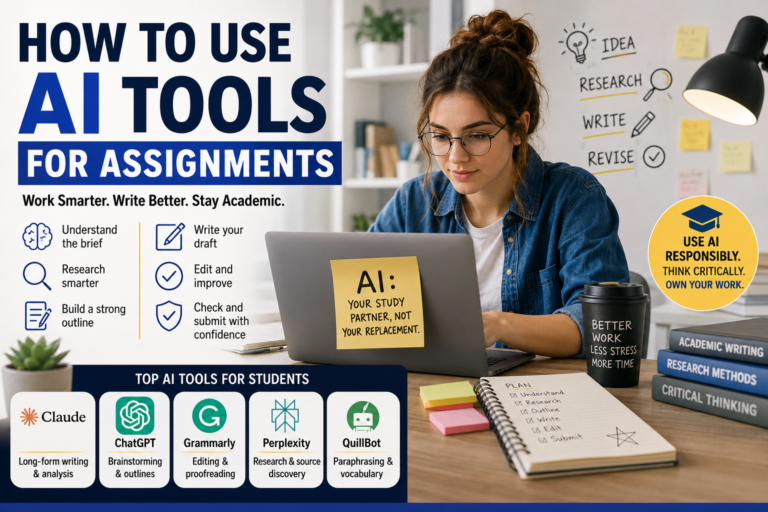
    How to Use AI Tools for Assignments (2026 Guide)

    Introduction

    The best way to use AI tools for assignments is not to let AI do your work — it is to let AI make your work significantly better. Most students either avoid AI entirely out of fear of academic penalties or rely on it too heavily and submit work that sounds nothing like them. However, there is a smarter middle ground that thousands of high-performing students are using right now. Fortunately, this guide shows you exactly where AI helps, which tools are worth using, and how to stay on the right side of your institution’s academic integrity policy while getting more done in less time.

    Why Students Need to Use AI Tools for Assignments Smartly

    why students need to use AI tools for assigments

    Academic life in 2026 moves faster than ever. Furthermore, students are juggling multiple deadlines, part-time jobs, and personal commitments simultaneously. As a result, the pressure to produce high-quality written work consistently—across multiple subjects—is genuinely overwhelming for most.

    AI tools do not eliminate that pressure. However, they do remove several specific bottlenecks that slow students down the most. Research takes hours. Structuring an argument from scratch is difficult. Finding the right sources is time-consuming. Editing your own writing is hard when you cannot see your own mistakes.

    Used correctly, AI tools handle the mechanical layer of assignment work—so your brain is free for the thinking layer.

    In addition, most institutions are not banning AI outright anymore. Instead, they are setting clearer guidelines about how it can and cannot be used. Consequently, understanding those boundaries and working confidently within them is now a core academic skill.

    Best AI Tools for Assignments in 2026

    best AI tools for assignments in 2026 including Claude, ChatGPT, Grammarly, Perplexity AI, and QuillBot


    Before getting into how to use them, it helps to know which tools are genuinely worth your time. Specifically, not every AI tool is equally useful for academic work.

    Claude — Best for Long-Form Writing and Analysis

    Claude handles long, complex writing tasks better than most AI tools available to students. Furthermore, it maintains a consistent academic tone across an entire essay without losing coherence halfway through—a common problem with shorter-context AI models.

    Use Claude to help structure essays, develop arguments, and refine your existing drafts. In addition, it is excellent for breaking down complex academic concepts into plain language when you are trying to understand a difficult topic before writing about it.

    Best for: Essays, literature reviews, analytical reports, and research summaries.

    ChatGPT — Best for Brainstorming and Outlines

    ChatGPT remains the most versatile AI tool for students who need a fast, reliable thinking partner. Moreover, its strength for assignment work specifically lies in brainstorming—generating ideas, angles, and structural outlines quickly before you start writing.

    Ask it to generate five different thesis statements for your essay topic. Ask it to outline a 2,000-word argument structure. Ask it to suggest counterarguments you should address. As a result, you start every assignment with a clear direction instead of a blank page.

    Best for: Brainstorming, outlining, counterargument generation, and quick concept explanations.

    Grammarly — Best for Editing and Proofreading

    Grammarly‘s AI layer goes beyond basic spell-checking in 2026. Specifically, it now checks for clarity, tone consistency, sentence variety, and academic formality — all critical factors in assignment quality.

    Run every finished draft through Grammarly before submitting. Furthermore, pay attention to the clarity suggestions, not just the grammar fixes. In many cases, the clarity edits improve your argument’s readability more than any other single change.

    Best for: Final proofreading, clarity editing, and academic tone checking.

    Perplexity AI — Best for Research

    Research is one of the most time-consuming parts of any assignment. Fortunately, Perplexity AI dramatically compresses research time by searching the live web, synthesizing information from multiple sources, and citing every claim with a linked reference.

    Use it to get a fast overview of your topic before diving deeper into academic databases. However, always verify Perplexity’s sources independently before citing them in your assignment. It is a research starting point — not a citation generator.

    Best for: Topic overviews, source discovery, and background research before writing.

    QuillBot—Best for Paraphrasing and Vocabulary

    QuillBot helps students paraphrase complex source material in their own words without losing the original meaning. Furthermore, its vocabulary enhancement suggestions help students who struggle to vary their language across long pieces of writing.

    Use it to rephrase dense academic text into language you genuinely understand before incorporating the idea into your own argument. As a result, your writing reflects real comprehension rather than copied phrasing.

    Best for: Paraphrasing source material and improving vocabulary variety.

    How to Use AI Tools for Assignments: Step-by-Step

    how students can use AI tools for assignments

    Now that you know which tools to use, here is exactly how to integrate them into your assignment workflow from start to finish.

    Step 1: Use AI to Understand the Assignment Brief

    Before writing a single word, paste your assignment brief into Claude or ChatGPT and ask it to explain exactly what the question is asking in plain language. Furthermore, ask it to identify the key concepts you need to cover and suggest an initial angle for your argument.

    This single step saves most students 30 to 60 minutes of confusion at the start of every assignment. Moreover, it ensures you are answering the actual question rather than the question you thought was being asked—one of the most common reasons students lose marks.

    Step 2: Use AI Tools for Assignment Research

    Open Perplexity AI and search your topic. Ask it for an overview of the key debates, major thinkers, and current developments in the area. Use its cited sources as a starting point, then go directly to those sources—or your institution’s academic database—to find the full original texts.

    In addition, ask ChatGPT to suggest specific search terms for Google Scholar or your library database. Consequently, your research session becomes targeted and efficient instead of broad and overwhelming.

    Step 3: Build Your Outline With AI Assistance

    Take your research notes and paste them into ChatGPT. Ask it to suggest a logical structure for your argument based on the points you want to make. Furthermore, ask it to identify any gaps in your argument that need additional evidence.

    However, do not use the AI outline blindly. Instead, treat it as a starting framework and reshape it based on your own thinking and your lecturer’s specific requirements. As a result, the final structure reflects your judgment — not just the AI’s default pattern.

    Step 4: Write the Draft Yourself First

    This is the most important step. Specifically, write your first draft yourself, using the outline you built and the research you gathered. Do not ask AI to write paragraphs for you at this stage.

    The reason is straightforward. Your institution can detect writing that does not match your established voice. Furthermore, writing the draft yourself ensures you actually understand the material—which matters when it comes to exams covering the same topics.

    Use AI as a reference while you write — ask it to clarify a concept, suggest a transition phrase, or check whether your argument is logically sound. However, keep the actual writing yours.

    Step 5: Use AI Tools for Assignment Editing

    Once your draft is complete, this is where AI earns its place most clearly. Paste your draft into Claude and ask for specific feedback — not a rewrite. Ask it to identify weak arguments, unclear sentences, and sections where your reasoning is not fully supported.

    Then paste the same draft into Grammarly for a full grammar, clarity, and tone check. Furthermore, read every suggestion critically—accept the ones that genuinely improve the writing and reject the ones that change your intended meaning.

    As a result, your final submitted assignment is sharper, clearer, and more polished than anything you could produce through self-editing alone.

    Step 6: Check for AI Detection Before Submitting

    Many institutions now run submissions through AI detection tools like Turnitin’s AI detector or GPTZero. Therefore, before submitting, read your final draft aloud. If any sentence sounds unnatural, overly formal, or unlike your normal writing voice—rewrite it in your own words.

    Furthermore, make sure every idea in the assignment is one you can explain verbally if asked. Consequently, if your lecturer questions your work, you can speak confidently about every argument you made.

    Common Mistakes Students Make When Using AI for Assignments

    common mistakes

    Submitting Raw AI Output

    The most damaging mistake is copying AI-generated text directly into an assignment without editing it. In addition to the academic integrity risk, raw AI output lacks the specific examples, cited sources, and personal analytical voice that lecturers are assessing. As a result, it scores poorly even when it is not flagged for AI use.

    Using AI to Replace Thinking

    AI is a thinking partner—not a thinking replacement. Furthermore, assignments exist to develop your ability to analyze, argue, and communicate complex ideas. Outsourcing that process entirely means you arrive at exams without understanding the assignments they were designed to build. Consequently, short-term convenience creates long-term academic problems.

    Ignoring Your Institution’s AI Policy

    Every institution has a different policy on AI use. Some allow it freely with disclosure. Others prohibit it entirely. Therefore, read your institution’s academic integrity guidelines before using any AI tool on assessed work. When in doubt, ask your lecturer directly—most appreciate the transparency.

    Frequently Asked Questions

    Is it cheating to use AI tools for assignments?

    It depends entirely on your institution’s policy. Many universities now permit AI as a research and editing aid while prohibiting AI-generated submission content. Therefore, always read your institution’s specific guidelines before using any AI tool on assessed work.

    Which AI tool is best for university assignments?

    Claude is the strongest tool for long-form academic writing and complex analysis. Furthermore, Perplexity AI is the most reliable for research, and Grammarly remains the best for final editing and proofreading. Used together, these three tools cover every stage of the assignment process.

    Can AI tools help with all types of assignments?

    Yes—essays, reports, case studies, literature reviews, and presentations all benefit from AI assistance at different stages. However, technical assignments like mathematics, coding projects, and lab reports require specialized tools beyond general writing AI.

    How do I avoid AI detection in my assignments?

    Write your draft yourself and use AI only for research, outlining, and editing feedback. Furthermore, read your final draft aloud and rewrite any sentence that sounds unnatural or unlike your normal voice. As a result, your submission reflects genuine human writing with AI-assisted polish.

    Are free AI tools good enough for assignments?

    Yes. The free tiers of ChatGPT, Claude, Perplexity AI, and Grammarly cover every stage of the assignment workflow for most students. Furthermore, paid upgrades add convenience and higher usage limits—not fundamentally different capabilities for standard academic tasks.

    Conclusion

    The most effective way to use AI tools for assignments is as a structured workflow—not a shortcut. Use AI to understand your brief, accelerate your research, build your outline, edit your draft, and polish your final submission. However, keep the thinking, the writing, and the argument yours.

    Students who master this approach in 2026 do not just submit better assignments. Furthermore, they develop faster, think more clearly, and build the writing skills that carry them well beyond university into every professional challenge that follows.

    Ultimately, AI is not here to do your assignments. It is here to help you do them better than you could alone.