Last checked: October 2026
What is the Gemini architecture behind modern Google AI tools?
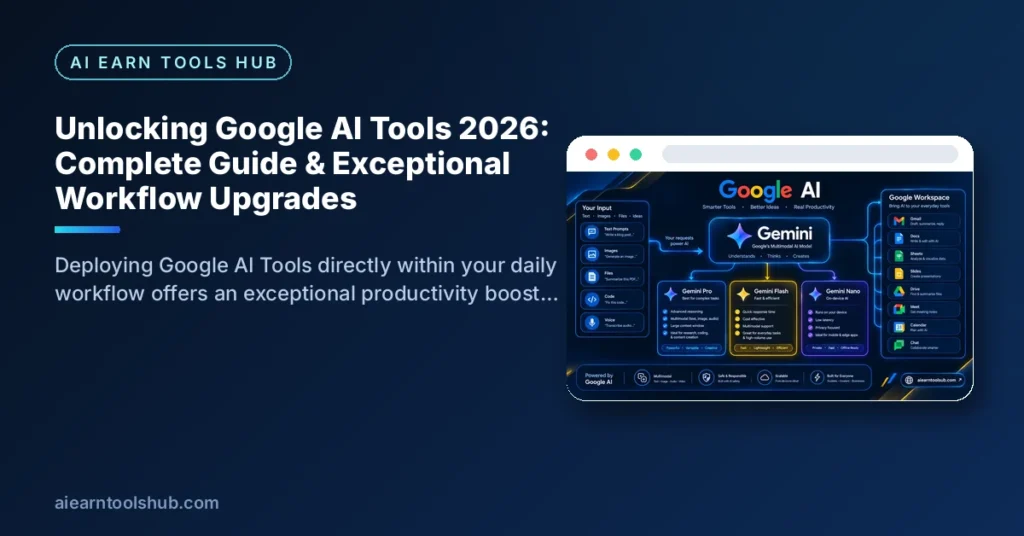
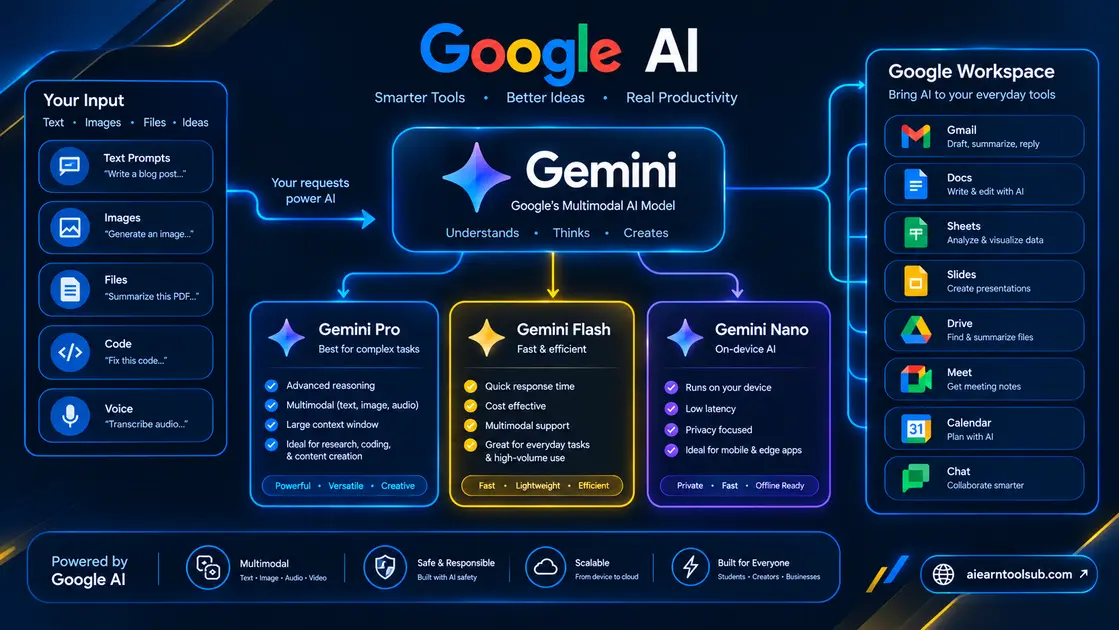
The short answer: one Gemini model family powers almost all modern Google AI tools. Use Pro for deep reasoning, Flash for fast everyday and API work, Flash-Lite for high-volume tasks, and Nano for private on-device features on your phone.
At the foundation of all current Google AI tools is the Gemini family. Built natively as a multimodal architecture, Gemini processes text, source code, visual images, audio feeds, and raw video simultaneously within a single core model.
| Model Variant | Core Technical Strength | Best Deployment |
|---|---|---|
| Gemini Pro | Complex reasoning, deep logic, and multi-step tasks | Software engineering, deep data analytics, agentic coding |
| Gemini Flash | High-speed execution with low latency | Real-time customer interactions, production APIs, fast text tasks |
| Gemini Flash-Lite | Maximum throughput at low computational cost | High-volume background processing, text classification |
| Gemini Nano | On-device local execution without cloud reliance | Mobile applications, offline voice transcripts, sensitive local data |
1. Gemini Pro for Complex Analytics
Gemini Pro serves as the enterprise-grade engine. It handles complex multi-step reasoning, parses large repositories of source code, evaluates financial documents, and generates verified technical outputs across complex domain datasets.
2. Gemini Flash for High-Speed API Workflows
Gemini Flash balances intelligence with rapid output generation. It is ideal for live consumer chat interfaces, instant email drafting, context extraction, and high-volume data translation tasks where low latency is essential.
3. Gemini Nano for On-Device Mobile Efficiency
Gemini Nano operates directly on mobile hardware. By processing computations locally, Nano guarantees faster response times and enhanced privacy protection for tasks like live call transcription and real-time smart replies without sending sensitive data over external networks.
How does NotebookLM keep research grounded in your sources?
The short answer: NotebookLM keeps research grounded by answering only from the sources you upload, and it shows citations for its claims. That makes it one of the most trustworthy Google AI tools for study notes, reports and document summaries.
Among specialized Google AI tools, NotebookLM stands out as a groundbreaking solution for factual accuracy. Standard generative language models can sometimes produce unverified facts, but NotebookLM operates strictly as a source-grounded research environment.
[ User Documents / PDFs / Links ] ──> [ Closed Source Sandbox ] ──> [ Grounded Answers & Citations ]
- Source-Grounded Accuracy: Output is restricted strictly to files uploaded into that specific project notebook (PDFs, Google Docs, text files, or web links).
- Clickable Footnote Citations: Every summary or answer includes direct inline citations pointing straight to the original page and paragraph in your reference materials.
- Audio Podcast Summaries: Automatically converts long technical documents into clear, two-speaker audio discussions for auditory learning and multi-tasking.
In practice, that grounded approach suits work where accuracy matters more than creativity. Students can turn lecture slides and readings into a single searchable notebook, then ask for definitions, comparisons and quiz-style questions that stay tied to the course material. Professionals can do the same with project documents, research reports and meeting transcripts, and use Audio Overviews to review the key points while commuting. Because every answer points back to a source, checking a claim takes seconds instead of a fresh search.
For small teams looking to optimize operational efficiency alongside these research utilities, review our complete guide on the Best AI Tools for Small Business Owners to streamline your core workflows.
How do Google AI tools upgrade Google Workspace productivity?
The short answer: Google AI tools upgrade Workspace by drafting in Gmail and Docs, building formulas in Sheets and summarizing meetings in Meet. You get AI help inside the apps you already use, instead of copying text between separate tools.
Integrating Google AI tools across Google Workspace transforms standard office applications into collaborative assistants.
| Workspace Application | Embedded AI Capability | Practical Workflow Impact |
|---|---|---|
| Gmail | Thread Summarization & Smart Drafts | Quickly digest lengthy email threads and write professional contextual replies. |
| Google Docs | Contextual Rewriting & Content Outlines | Overcome writer’s block, adjust tone, and outline detailed documentation instantly. |
| Google Sheets | Auto Formula Generation & Data Tables | Convert plain English requests into functional spreadsheet formulas and summary charts. |
| Google Meet | Real-Time Transcripts & Action Notes | Automatically transcribe meetings and generate clear follow-up tasks for project management. |
If you regularly edit web content or refine published drafts after generating initial outlines in Docs, explore our tested round-up of the best free AI article rewriter tools for further text optimization.
A simple way to start is to pick one repeated task in each app. Summarize the longest email thread in your inbox, ask Docs to outline your next report, describe a Sheets calculation in plain English instead of writing the formula yourself, and let Meet capture notes and action items while you focus on the conversation.

Developer Infrastructure: Google AI Studio vs. Vertex AI
The short answer: start with Google AI Studio when you want to test prompts and get an API key in minutes, and move to Vertex AI when you need enterprise security, governance and scale. Both are developer-facing Google AI tools, but they are built for different stages of a project.
Developers who need to build custom web applications, deploy agentic software, or access API models can leverage two primary developer-facing Google AI tools:
- Google AI Studio: A fast, browser-based environment designed for rapid prototyping, prompt testing, and instant API deployment. You can test configurations directly on official environments via Google AI Studio.
- Vertex AI: An enterprise-grade development platform built into Google Cloud. It offers full MLOps pipelines, custom model fine-tuning, security governance, and scalable infrastructure. Learn more through official documentation on Google Cloud Vertex AI.
Many developers use both Google AI tools in sequence. A typical workflow is to prototype a prompt in AI Studio, check that the output format is stable, export the model settings into code, and then rebuild the same flow in Vertex AI before a public launch. That split keeps experimentation fast and cheap while reserving production traffic, access controls and monitoring for the platform designed to handle them.
Multimodal Search & Visual Intelligence
The short answer: multimodal Google AI tools let you search and ask questions with images, voice and video, not just typed keywords. Google Lens identifies what your camera sees, and AI Overviews summarize answers directly at the top of Search.
Search technology has evolved beyond static keyword queries into real-time visual and conversational reasoning:
- Google Lens: Turns smartphone cameras into visual search engines. Users can scan physical machinery, translate menus overlaying real-world video feeds, or extract text directly from handwritten paper notes.
- AI Overviews in Search: Synthesizes direct, comprehensive summaries atop Google SERPs for complex, multi-part search queries, referencing authoritative citation links across the open web.
These tools are most useful when typing is the slowest option. Point Lens at a product, plant, document or sign to identify it, translate it or extract its text in one step, then follow up in Gemini if you need a longer explanation. For research questions, read the AI Overview for a quick synthesis, but open the cited sources before you rely on any important detail.
Which Google AI tool should you use for each task?
The short answer: match the tool to the task instead of using one app for everything. Gemini is the best all-rounder among Google AI tools, NotebookLM is best for source-based research, AI Studio is best for building and testing, and Lens is best for visual questions.
| Task | Best Google AI Tool | Why It Wins |
|---|---|---|
| Writing and drafting | Gemini and Google Docs | Fast first drafts, rewrites and summaries in the apps you already write in |
| Research and studying | NotebookLM | Answers grounded in your own sources, with citations you can check |
| Coding and prototyping | Google AI Studio | Browser-based prompt testing with quick access to Gemini API keys |
| Images | Gemini image generation | Create and edit images from a text prompt inside the Gemini app |
| Video | Flow | Google’s AI filmmaking tool for generating and editing video clips |
| Meetings | Google Meet with Gemini | Transcripts, notes and action items captured during the call |
For writing and everyday drafting
Start with Gemini for outlines, first drafts, rewrites and summaries, then polish the result in Google Docs. Gemini is the most flexible of the Google AI tools because the same chat can brainstorm headlines, shorten a report or change the tone of an email. If your writing is meant to rank in search, pair this workflow with our step-by-step guide on how to use AI for SEO so the draft is structured around real search intent from the start.
For research and studying
Choose NotebookLM when the answer must come from specific documents rather than the open web. Upload the PDFs, notes or links for one project, then ask questions, build a briefing and listen to an Audio Overview. For wider topics that go beyond your sources, switch to Gemini and use Deep Research to gather and synthesize information from across the web before you narrow it down.
For coding and building apps
Choose Google AI Studio to test prompts, compare Gemini models and generate an API key for a prototype. Move the winning setup to Vertex AI when the project needs production controls. Developers who are still deciding can treat AI Studio as the workshop and Vertex AI as the factory: experiment in the first, ship from the second.
For images
Use the image generation built into Gemini, powered by Google’s Nano Banana image model, to create blog graphics, product mock-ups and social visuals from a plain-English description. Describe the subject, style, lighting and aspect ratio in your prompt, then ask for variations instead of starting again. Always check hands, text and logos carefully before you publish an AI-generated image.
For video
Use Flow, Google’s AI filmmaking tool, when you want to generate and assemble short video clips from text prompts and images. Flow is built for creators who need scenes, camera movement and consistent characters rather than a single clip. Short-form creators can plan a sequence in Flow, then edit the best takes in their normal video editor.
For meetings
Use Google Meet with Gemini for live transcripts, automatic notes and clear action items after the call. This is one of the most practical Google AI tools for remote teams because nobody has to volunteer as note-taker. Review the AI notes before sharing them, correct names and figures, and move the action items into your task list while the discussion is still fresh.
If you only install or bookmark three tools today, make them Gemini for everyday work, NotebookLM for research and Lens for visual search. Together they cover most tasks, and every other tool in this guide becomes a specialist upgrade you can add when a project demands it.
How much do Google AI tools cost? Free tiers and limits explained
The short answer: you can use the core Google AI tools for free, including Gemini, NotebookLM, Lens and a free tier of Google AI Studio. Paid Google AI plans mainly buy higher usage limits, larger context windows and advanced features such as video generation in the Gemini app.
Gemini: free limits and context window
On the free plan, Gemini Apps run with standard usage limits, and uploads use a 32,000-token context window, according to Google’s official Gemini Apps limits page, checked in October 2026. Image generation is included on the free plan, while video generation in the Gemini app requires a Google AI plan. Paid plans raise the limits and expand the context window, which matters most when you analyze long documents or large code files.
NotebookLM: free notebooks and sources
The free Standard plan for NotebookLM allows up to 100 notebooks per user and up to 50 sources in each notebook, according to Google’s official plans page, checked in October 2026. For most students and individual researchers, those free limits are generous: a separate notebook for every subject or project still leaves room to spare. Paid plans raise the notebook and source limits and add premium sharing and customization features.
Google AI Studio and the Gemini API: free-tier rate limits
Google AI Studio is free to start, and the Gemini API free tier applies rate limits per project rather than per API key. Google measures those limits in requests per minute, tokens per minute and requests per day, they vary by model, and daily quotas reset at midnight Pacific time, as explained on the official Gemini API rate limits page. Check your live limits inside AI Studio before a launch, because Google does not guarantee fixed free-tier numbers.
Flow and video tools: what is free?
Flow is Google’s AI video tool, available through Google Labs, and the amount of video you can generate depends on the Google AI plan attached to your account. Treat free access as a way to test scenes and learn the workflow rather than to produce a full channel of content. If video becomes a regular part of your work, a paid plan is usually the first upgrade that pays for itself.
When is a paid Google AI plan worth it?
A paid plan is worth it when you regularly hit free limits, analyze very long files, or need features that the free tier leaves out, such as video generation in Gemini. It is not worth it for occasional questions, short summaries and light study use, where the free Google AI tools already do the job well. Start free, note the first limit that actually slows you down, and upgrade only to solve that specific problem.
How to get started with Google AI tools in 15 minutes
The short answer: you can try the main Google AI tools in about 15 minutes with nothing but a Google account. Work through the five steps below in order and you will have written, researched and searched with AI by the end.
- Open Gemini and ask a real question (3 minutes). Go to the Gemini app, sign in with your Google account and paste a task you already have today, such as summarizing a long article or drafting a reply. Judge the workflow on real work, not a test prompt.
- Create your first NotebookLM notebook (4 minutes). Upload one PDF or paste one link, then ask two questions about it and click a citation to see the source passage. This is the fastest way to understand grounded research.
- Try one Workspace shortcut (3 minutes). Open Gmail or Docs and use the built-in Gemini help to summarize a thread or outline a document you are already working on. Small wins inside familiar apps build the habit fastest.
- Test a prompt in Google AI Studio (3 minutes). Run the same prompt you used in Gemini, change the model settings and compare the outputs side by side. Developers will see immediately why AI Studio is the prototyping tool of choice.
- Search with your camera (2 minutes). Open Google Lens, point it at an object, sign or page of text and translate or extract the text. Visual search is the feature most new users underestimate.
After these steps, keep the two tools that saved you the most time and build a daily habit around them. The best setup is personal: the right Google AI tools are the ones that remove your own most repeated tasks, not the ones with the longest feature list.
Frequently Asked Questions (FAQ)
Here are direct answers to the questions readers ask most often about Google AI tools, including cost, accuracy and search rankings.
Are Google AI tools free to use?
Most standard consumer integrations across Google Search, Gmail, Docs, and Google Lens offer robust free access tiers. Advanced capabilities, high-frequency developer API limits, and expanded storage require paid tiers such as Google One AI Premium or Google Cloud accounts.
How does NotebookLM prevent false information (hallucinations)?
NotebookLM uses Retrieval-Augmented Generation (RAG) to restrict outputs strictly to source documents uploaded directly to your notebook sandbox, preventing the model from hallucinating unverified web information.
Will using AI-assisted content harm my website’s search engine rankings?
Google evaluates web content based on depth, accuracy, user intent, and original value rather than its creation method. Content written or assisted by AI can rank well as long as it provides helpful, verified insights for human readers.

[…] available on the free plan), real-time word customization, and direct browser extensions for Google Docs and […]
[…] put this into practice, see our tested list of the best AI SEO tools and our roundup of Google AI tools you can start using for free […]