
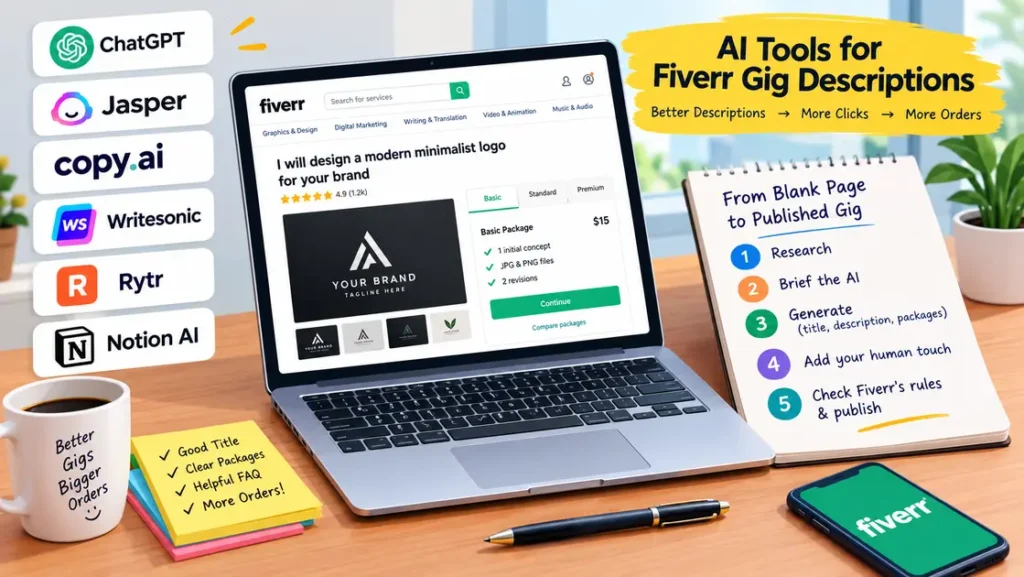
Your gig description does more selling than any promotion you’ll ever run on Fiverr. A buyer lands on your page, skims for thirty seconds, and decides. The right AI tools for Fiverr gig descriptions turn that pressure into a twenty-minute task: a solid first draft with a keyword-rich title, clear packages, and an FAQ that answers objections before they’re asked.
Below: six tools worth your time, a five-step workflow from blank page to published gig, copy-paste prompts, and the mistakes that make AI-written gigs look spammy.
Key takeaways
- AI tools for Fiverr gig descriptions work best as first-draft machines — you add the proof, personality, and accuracy.
- The winning formula: keyword-rich title + benefit-led description + three clear packages + an FAQ that kills objections.
- ChatGPT is the most versatile free option; Jasper and Copy.ai are stronger for consistent marketing-style voice.
- Always rewrite AI output in your own voice and verify every claim — Fiverr penalizes misleading gigs.
Why Your Gig Description Decides Whether You Get Orders
Fiverr search shows buyers a thumbnail, a title, and a price. The click is cheap—conversion happens on the gig page, and the description carries it. A vague description (“quality work, order now”) gives buyers nothing to trust. A specific one tells them exactly what they get, how fast, and why you’re the safe choice.
New sellers usually struggle here because English isn’t their first language or they don’t know what buyers care about. That’s where AI tools for Fiverr gig descriptions earn their place: a structured, readable draft you can fix in minutes instead of agonizing over for hours. One rule first—Fiverr requires honest representation of your skills. Use AI to express what you genuinely offer more clearly, never to invent experience. Fiverr’s own Creating a Gig guide covers the official rules on titles, packages, and policies.
6 Best AI Tools for Fiverr Gig Descriptions
Tested against one job: produce a complete gig description for a logo design service, including title ideas, three package descriptions, and an FAQ.
1. ChatGPT—the all-rounder
The most flexible free choice among AI tools for Fiverr gig descriptions. It handles everything in one session—titles, description, package tiers, FAQs, even buyer-requirement questions—and its real strength is iteration: ask it to shorten, sharpen, or rewrite in a different tone while it remembers your service details.
Best for: sellers who want one free tool that does everything. Comparing platforms first? Our freelance websites guide shows where beginners get traction fastest.
2. Jasper—marketing copy with a consistent voice
Jasper writes benefit-led sentences and natural calls to action, and its brand-voice feature learns your tone from samples so your fifth gig sounds like your first. The catch is price—plans start around $39/month, so it makes sense once you’re earning.
Best for: sellers building multiple gigs with a consistent, salesy voice.

3. Copy.ai—fast drafts from short briefs
Copy.ai’s workflows turn a short brief (service, niche, target buyer) into a structured gig draft in seconds. Output needs more editing than Jasper’s, but the free tier is generous, and the speed is ideal when testing several gig ideas.
Best for: sellers experimenting with multiple gig concepts who need quick drafts.
4. Writesonic—SEO-friendly gig copy
Writesonic leans into SEO, which matters because Fiverr is a search engine. Give it target keywords (“minimalist logo design”) and it weaves them into titles and descriptions naturally instead of stuffing them. Also handy for refreshing old gigs that stopped converting.
Best for: sellers who want gig descriptions optimized for Fiverr search from day one.
5. Rytr—budget-friendly and simple
Rytr costs a fraction of the premium for tools and handles the basics well: clean descriptions, FAQ lists, and tone adjustments. Minimal interface, decent output. It won’t win creativity awards, but for straightforward services like data entry it’s plenty.
Best for: new sellers on a tight budget with simple service offerings.
6. Notion AI—write where your business docs live.
If you run your freelance work in Notion, Notion AI drafts gig descriptions next to your pricing notes and client templates—so your gig copy, packages, and delivery checklists stay in sync.
Best for: organized sellers who manage everything from one workspace.
How to Use AI Tools for Fiverr Gig Descriptions: A 5-Step Workflow
Twenty minutes, works with any of the AI tools for Fiverr gig descriptions above.
Step 1: Research before you generate.
Search Fiverr for your category and study the top 5 gigs: their titles, package structures, and repeating FAQs. You’re looking for patterns, not copying—the patterns show your AI tool what “good” looks like in your niche.
Step 2: Brief the AI like a client would brief you.
Vague prompts produce vague gigs. Give the tool your exact service, target buyer, differentiator, delivery time, and revisions. Example: “Logo design for startups, 3 initial concepts, vector files, 2 revisions, 3-day delivery, I specialize in minimalist tech logos.”
Step 3: Generate the title, description, and packages separately.
Don’t ask for everything in one giant prompt. Get 5 title options first and pick the strongest. Then the description. Then the three package descriptions. Short, focused prompts produce sharper copy at each step.
Step 4: Add the human layer.
The step most sellers skip—and the whole game. Replace generic claims with specifics: projects completed, tools you use, and what your process looks like. Add one line that sounds like a real person wrote it. Our guide on becoming a freelance writer makes the same point: specifics build trust; adjectives don’t.
Step 5: Check Fiverr’s rules, then publish.
Verify every claim is true, and you can deliver what’s promised. Then publish and watch your analytics—Fiverr shows impressions and clicks, so within two weeks you’ll know whether the description needs a rewrite.
3 Copy-Paste Prompt Templates
Fill in the brackets and paste into any of the AI tools for Fiverr gig descriptions above.
Template 1 — Gig titles:
Write 7 Fiverr gig title options for: [your service]. Target buyer:
[who hires you]. Keep each under 70 characters, start with "I will",
include the keyword [main keyword] naturally. Rank strongest to weakest.
Template 2 — Main description:
Write a Fiverr gig description for [service] for [target buyer].
Include: a 2-line hook about the buyer's problem, 4-6 bullets of exactly
what's included, one short paragraph on my edge ([your real advantage]),
and a friendly call to action. Confident, plain English, no hype. Under
250 words.
Template 3 — Packages and FAQ:
For my Fiverr gig "[gig title]", write: 1) Three package descriptions
(Basic/Standard/Premium) that clearly escalate in value, each under 60
words. 2) Five FAQs buyers actually ask about [service], with honest
one-paragraph answers — include delivery time and revisions.
5 Mistakes That Make AI-Written Gig Descriptions Look, Spammy.
- Publishing the first draft untouched. AI defaults to generic phrasing (“high-quality,” “top-notch”). If your description could describe any seller, buyers scroll past.
- Keyword stuffing. Repeating your keyword nine times doesn’t help you rank—Fiverr’s search is smarter than that, and buyers find it unreadable.
- Invented credentials. “10 years of experience” when you started last month leads to bad reviews and account warnings.
- Hype with no proof. “Best gig on Fiverr!!!” followed by zero specifics. Replace every superlative with a fact.
- Ignoring the FAQ section. Buyers with unanswered questions don’t order—they leave. Five honest FAQs take ten minutes with AI help.
FAQ
Can I use AI to write my Fiverr gig description, or is it against the rules?
Yes. Fiverr doesn’t ban AI-assisted writing—it bans misleading content. As long as every claim is true and you can deliver what’s promised, using AI tools for Fiverr gig descriptions is fine. Many top sellers do this and personalize heavily.
Will buyers know my gig was written with AI?
Only if you publish raw output. Generic phrasing and vague superlatives are the giveaways. Add your real process, real numbers, and a sentence or two that sound like you, and it reads as human—because the important parts are.
What’s the best free AI tool for Fiverr gig descriptions?
ChatGPT’s free tier covers the full workflow: titles, descriptions, packages, and FAQs. Pair it with one of the free AI writing tools we reviewed for grammar and readability checks.
How long should a Fiverr gig description be?
Aim for 150–300 words. Enough to cover what’s included, your process, and your edge—short enough that a skimming buyer reads all of it. Packages and FAQs carry the detail; the description carries the pitch.
Should I include keywords for Fiverr SEO?
Yes, naturally. Use your main keyword in the title and once or twice in the description. Fiverr also indexes your tags and category, so the description doesn’t need to carry all the SEO weight alone.
Bottom Line
AI tools for Fiverr gig descriptions won’t win orders by themselves—but they compress the hardest part of gig creation into twenty focused minutes. Pick one tool, follow the five-step workflow, add your real specifics, and publish. Then let Fiverr’s analytics tell you what to improve. The sellers who win aren’t the best writers; they’re the ones who ship, measure, and rewrite.
Last updated: October 13, 2026. Tool pricing and Fiverr’s policies change—verify current details on the official sites before you rely on them.


[…] build three portfolio samples, then pitch. Our guides to writing Upwork proposals with ChatGPT and Fiverr gig descriptions with AI cover the exact […]