

Freelance websites are online marketplaces where independent professionals find clients, send proposals or list services, and get paid through the platform, usually for a fee. Upwork suits most people, Fiverr suits packaged services, Toptal suits senior experts, and Contra suits anyone who wants to keep more of what they earn.
A designer in Berlin, a developer in Toronto, a writer in Austin, and a virtual assistant in Melbourne all ask the same question: which freelance websites are actually worth my time? The honest answer is that it depends on your skill, your experience, and how much of each payment you are willing to hand over.
This guide compares nine freelance websites by fees, entry difficulty, and who each one suits, then shows you how to win your first job and avoid the scams that target new freelancers. Fee figures come from recent comparison guides, checked on October 9, 2026, and platforms change them often, so confirm on each platform before you sign up.
Key takeaways
- Fees range from about 0 percent on commission-free platforms to 20 percent on Fiverr, and the difference adds up fast.
- Fiverr and Contra are common starting points for beginners. Upwork suits people with samples. Toptal accepts only about the top 3 percent of applicants.
- Pick one or two freelance websites and build reviews before spreading yourself thin.
- Never take payment off the platform for early jobs, and never pay to get work.
- Use freelance websites to start, then grow toward repeat and direct clients.
Freelance Websites at a Glance
| Platform | Best for | Freelancer fee | Entry difficulty |
|---|---|---|---|
| Upwork | Largest range of jobs, hourly and fixed-price | Variable, 0 to 15% per contract | Medium |
| Fiverr | Packaged services that clients order | 20% | Low |
| Freelancer.com | Bidding and contests | 10% or a $5 minimum | Low |
| Toptal | Senior developers, designers, and finance experts | No direct commission; the client pays a markup. | Very high |
| Contra | Portfolio-first independent work | 0% reported | Low |
| PeoplePerHour | UK and European clients | Sliding scale, about 3.5 to 20% | Medium |
| Guru | Mid-range projects | About 5 to 9%, depending on membership | Low to medium |
| 99 Designs | Graphic design projects and contests | Check current terms. | Medium |
| Malt | European freelancers and clients | 0% reported; the client pays a fee. | Medium |
Fees vary by contract, earnings level, and region, and sources disagree on some figures. Treat this table as a starting point and read each platform’s current fee page.
9 Best Freelance Websites to Find Work
1. Upwork: The Largest Marketplace
Upwork has the widest range of categories and contract types, from one-off projects to long-term hourly work. You find jobs and send proposals. Recent guides list its freelancer service fee as variable, set per contract, and capped at 15 percent, and it has used a credit system for sending proposals, so check the current costs. It suits people with some samples and the patience to write good proposals.
2. Fiverr: Packaged Services
Fiverr works the other way round. You create service listings, called gigs, and clients order them, so you do not bid for every job. That makes it a common starting point for beginners, especially in design, video, writing, and social media. The freelancer fee is 20 percent, and buyers pay a processing fee of about 5.5 percent, according to Fiverr’s own comparison guide. Competition is heavy, so a narrow, specific gig stands out.
3. Freelancer.com: Bidding and Contests
Freelancer.com is built around bidding and contests, with a broad range of categories. Its fee is generally listed as 10 percent or a $5 minimum. Client quality varies, and one recent guide rates it low to medium, so be selective about which projects you bid on.
4. Toptal: Elite Talent Only
Toptal accepts only about the top 3 percent of applicants after a demanding screening process. Freelancers pay no direct commission because Toptal adds its margin to the client’s price and guides report rates of $60 to $200+ per hour. It is not a place to start. Consider it after you have years of proven experience.
5. Contra: Commission-Free and Portfolio-First
Contra is reported to charge freelancers no commission, and it focuses on portfolios over proposals. The trade-off is lower client volume than Upwork or Fiverr. Guides disagree on whether any client-side fees apply, so check Contra’s current terms before you rely on the zero-fee claim.
6. PeoplePerHour: UK and European Clients
PeoplePerHour is strongest for UK and European work in web, marketing, and creative services. Its fee uses a sliding scale, reported at about 20 percent on early earnings and falling to a few percent as you earn more from a client. That can make it cheaper than Fiverr on larger, repeat work.
7. Guru: Mid-Range Projects
Guru is an older platform for mid-range projects. Its fees are reported at roughly 5 to 9 percent depending on membership level, though that figure comes from an older source, so confirm it. It has a smaller audience than Upwork, which can mean less competition.
8. 99designs: For Graphic Designers
99designs is a specialist marketplace for graphic design, including contests where several designers submit work and the client picks a winner. Contests can mean unpaid effort, so many designers prefer direct projects. Check the current fee terms before you join.
9. Malt: A European Option
Malt is a European freelance platform that is reported to charge freelancers no commission and take its fee from clients. It is worth a look if you work with European companies and speak the relevant languages.
Best Freelance Websites by Skill
Guides commonly suggest these starting points, though your results will depend on your portfolio and niche.
| Skill | Good places to start |
|---|---|
| Web or app development | Upwork, then Toptal, once senior |
| Graphic design | 99designs, Fiverr |
| Writing and content | Upwork, Contra |
| Video editing | Fiverr, Upwork |
| Social media and marketing | Fiverr, Upwork, PeoplePerHour |
| Consulting and finance | Toptal, LinkedIn |
| Complete beginners | Fiverr, Contra |
If marketing is your skill, see our full guide to freelance digital marketing.
How Much Do Freelance Websites Really Cost You?
Fees look small until you do the math. Here is what you keep from a single project at different commission levels:
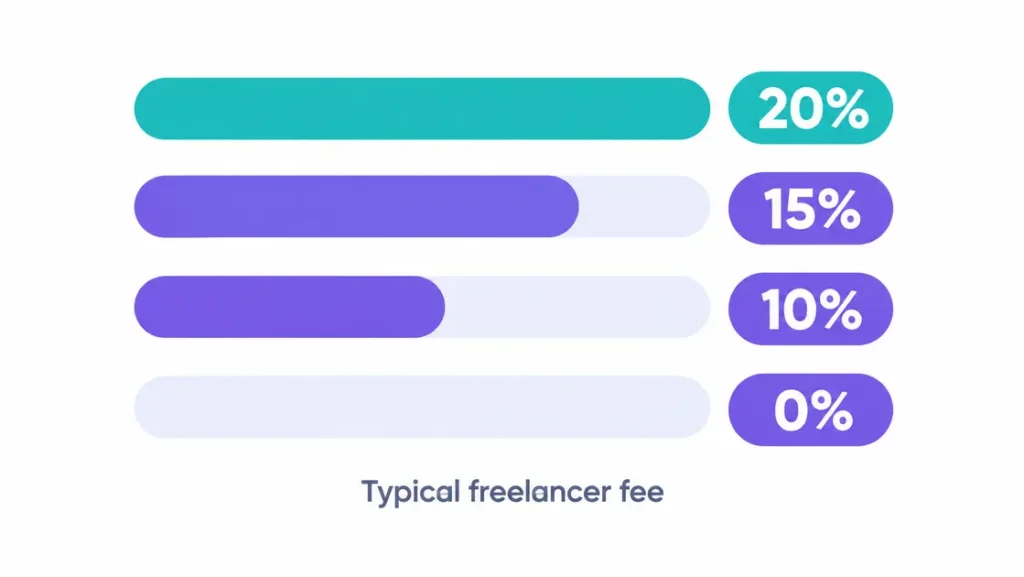
| Fee | Keep from $1,000. | Keep from $5,000. | Fees are $60,000 a year |
|---|---|---|---|
| 20% | $800 | $4,000 | $12,000 |
| 10% | $900 | $4,500 | $6,000 |
| 0% | $1,000 | $5,000 | $0 |
Lower fees do not automatically mean more income. A commission-free platform with few clients can pay less than a 20 percent platform with plenty of work. Also count withdrawal fees, currency conversion, membership costs and the credits some platforms charge for sending proposals. Withdrawal methods and rules vary by country, so check what is available where you live.
For a fuller picture of platform fees across more sites, see comparison guides such as Etemora’s freelancing platform comparison and GigRadar’s Upwork alternatives guide.
How to Win Your First Job on Freelance Websites
- Pick one or two platforms. Spreading across five freelance websites leaves every profile half-finished.
- Complete your profile. Use a clear headline, a real photo, relevant skills, and two or three work samples.
- Offer something narrow. “Proofreading blog posts in 24 hours” beats “I do all writing.”
- Write tailored proposals. Open by showing you read the brief and understood the problem.
- Price fairly, not cheaply. A small discount on a first job can earn a review, but do not undercut yourself permanently.
- Deliver early and communicate. Fast, clear replies earn reviews and repeat work.
- Ask for a review. The first five to ten reviews matter most.
A simple proposal structure that works across freelance websites:
Hi [Name], I read your brief about [specific problem]. I have done [similar work] and would approach it in two steps: [step one] and [step two]. I can deliver [deliverable] by [date] for [price]. Could you confirm [one clarifying question]?AI can help you draft and sharpen proposals, but never send a generic one. Our guide to how to write AI prompts and our overview of AI productivity tools show how to use AI without sounding robotic.
Scams and Red Flags on Freelance Websites
Scammers target new freelancers because they are eager for work. Watch for these:
- Requests to pay outside the platform. You lose payment protection and often break the platform’s rules.
- Fake-check or overpayment schemes. No real client sends you a check and asks you to forward part of it or buy gift cards.
- Pay to apply or buy equipment. Real clients do not charge you to work for them.
- Large unpaid “tests.” A short sample is fine. Free real work is not.
- Unverified payment methods. Prefer clients with verified payment on the platform.
- Links and downloads from strangers. They can be phishing or malware.
The FTC’s guide to job scams explains the common patterns. If you live outside the US, report scams to your national consumer protection agency.
Freelance Websites vs Direct Clients
Freelance websites give you a fast start, built-in payment protection, and a steady stream of leads, but fees and competition eat into your earnings. Direct clients pay more per project and cost no commission, but finding them takes outreach and time.
A common path is to use freelance websites to earn your first reviews and income, then build direct relationships through referrals, a portfolio site, and outreach. Read each platform’s terms first, because many restrict moving clients off-platform within a certain period. For ways to earn while you build, see our guide on how to earn money fast.
Common Mistakes to Avoid
Most disappointment with freelance websites comes from a handful of avoidable habits.
- Joining everything at once. Focus on one or two platforms until you have reviews.
- Sending generic proposals. Clients ignore copy-and-paste pitches.
- Racing to the bottom on price. Cheap work attracts difficult clients and makes raising rates harder.
- Ignoring fees. Work out your take-home before you accept a price.
- Taking payment off-platform too soon. It breaks the rules and removes your protection.
- Neglecting your profile. A thin profile loses jobs to better ones.
Bottom Line: Which Freelance Websites to Start With
Most beginners should start with Fiverr or Contra, add Upwork once they have a few samples, and consider PeoplePerHour or Malt for European clients. Designers should look at 99designs, and senior specialists should consider Toptal.
The best freelance websites are the ones where your skills match real demand and the fees leave you with a fair income. Start narrow, collect reviews, protect yourself from scams and move toward direct clients as you grow.
Freelance Websites: Frequently Asked Questions
What are the best freelance websites for beginners?
Fiverr and Contra are common starting points: Fiverr because buyers find your listing without you bidding, and Contra because it is portfolio-first and reported to charge freelancers no commission. Upwork has more jobs but more competition. Pick one platform, build a clear profile and earn your first reviews before adding another.
Which freelance websites pay the most?
Toptal typically pays the most, with reported rates of $60 to $200+ per hour, but only about the top 3 percent of applicants are accepted. On open marketplaces such as Upwork and Fiverr, pay depends on your skill, niche and reviews, and fees reduce your take-home.
Which freelance websites have the lowest fees?
Contra and Malt are reported to charge freelancers no commission, and Toptal charges none directly because clients pay its markup. Freelancer.com is about 10 percent, Upwork’s fee is variable up to 15 percent, and Fiverr takes 20 percent. Fees change, so check each platform’s current terms.
Are freelance websites safe and legit?
Mainstream platforms are generally safe because they hold payment and offer dispute processes, but scams exist. Never move payment off the platform, never accept a check and send money back, and never pay to apply for a job. Be skeptical of anyone promising easy money for little work.
Can I make a full-time income on freelance websites?
Yes, some freelancers do, but it usually takes months to build reviews, repeat clients and the right rates. Many start part-time, learn which platform and niche pay best, and then grow direct clients. Income varies widely and is never guaranteed, so test before you quit a job.
Read Next
- Freelance Digital Marketing: 7 Best Steps to Start (2026)
- How to Earn Money Fast: 9 Best Legit Ways (2026)
- ChatGPT for Making Money Online
- AI Productivity Tools: 7 Best Picks to Save Hours (2026)
This article is general information, not financial, tax or legal advice. Fees, rules and earnings vary by country and change often. Figures were checked on October 9, 2026.




[…] check you read their post. The rest of the template can stay. New to freelance platforms? Our freelance websites guide compares Upwork with […]
[…] for: sellers who want one free tool that does everything. Comparing platforms first? Our freelance websites guide shows where beginners get traction […]
[…] Learning to remove background from product photos is one of the highest-ROI skills a small seller can pick up—a photographer charges per shot, AI does it free, and it pairs with other free AI tools for online earning. […]