Key takeaways
- There is no official “ChatGPT resume builder” app — the winning method is using ChatGPT as a chat gpt resume builder through 8 targeted prompts: master cleanup, keyword mining, bullet rewriting, skills section, summary, tailoring, proofreading, and the ATS audit.
- Feed ChatGPT your raw work history (job titles, dates, rough accomplishments) and a target job ad — vague prompts like “write my resume” produce generic filler every time.
- ChatGPT writes the *words*, not the *document*: paste its output into a clean single-column template and run an ATS check before submitting.
- The 5-minute tailoring trick (one reusable prompt per job ad) beats sending the same resume to 50 postings — recruiters scan for mirrored keywords.
- Never let AI invent employers, dates, or metrics. Ask it to flag its own assumptions so you can correct them before a background check does.
Table of Contents
- What a “Chat GPT Resume Builder” Actually Means
- Before You Prompt: Gather These 5 Things
- The 8 Copy-Paste Prompts (Step by Step)
- Turn the Draft into a Formatted Resume
- The 5-Minute Tailoring Trick for Every Job
- Make It ATS-Friendly: The Final Audit
- 5 Mistakes That Make AI Resumes Obvious
- FAQs
- Bottom Line
There’s no official ChatGPT resume builder you can download — and the apps in the Play Store with that name are third-party wrappers, not OpenAI products. But that hasn’t stopped millions of job seekers from turning ChatGPT into a chat gpt resume builder that outperforms the fill-in-the-blank templates: the trick isn’t the tool, it’s the sequence of prompts.
Most people type “write me a resume for a marketing manager” and get back polished-sounding filler that could belong to anyone. Recruiters spot it instantly, and applicant tracking systems (ATS) — the software that filters an estimated three-quarters of applications before a human sees them — don’t care how pretty the sentences are. The chat gpt resume builder method below fixes both problems: eight specific prompts that take you from rough work history to a tailored, ATS-friendly resume, with a real formatting and audit step ChatGPT can’t do for you.
What a “Chat GPT Resume Builder” Actually Means
Let’s clear up the confusion first. Search “chat gpt resume builder” and you’ll find two very different things: mobile apps that bolt a ChatGPT API onto resume templates, and guides (like this one) that teach you to use ChatGPT itself as the writing engine. The second approach wins — it’s the true chat gpt resume builder method — and it’s free.
Here’s the honest division of labor. ChatGPT is superb at three resume jobs: restructuring messy work history into clean sections, rewriting duty-lists into achievement bullets with metrics, and tailoring your content to mirror a specific job ad’s keywords. It is bad at three others: formatting (it outputs plain text, not a designed document), verifying (it will happily invent a job title or inflate a number if you let it), and knowing your real accomplishments (it can only polish what you feed it).
So the workflow that actually works: you bring the facts, ChatGPT does the writing, a simple template handles the layout, and an ATS checker does the final audit. Total cost: $0, using the free tier of ChatGPT. The eight prompts below follow that exact order.
Before You Prompt: Gather These 5 Things
Garbage in, garbage out applies double to AI resumes. Spend 20 minutes collecting this before you open ChatGPT — it’s the difference between a resume that sounds like you and one that sounds like a template:
- Your raw work history — every job title, employer, start/end dates, and 3–6 rough accomplishments per role. Bullet fragments are fine (“led team of 5 support agents”, “cut ticket backlog”).
- Your education and certifications — schools, degrees, graduation years, plus any current certs or badges.
- A skills brain-dump — every tool, software, language, and methodology you can genuinely use. Don’t self-filter yet.
- One target job ad — the actual posting you’re applying to, copied in full. This is the secret ingredient most guides skip.
- Your constraints — target role, industry, and how long the resume should be (1 page for early career, 1–2 for experienced).
With that in hand, you’re ready. Each prompt below builds on the last, so run them in order in a single chat thread — ChatGPT keeps the context, and the resume gets sharper with every step.
The 8 Copy-Paste Prompts (Step by Step)
Watch: how the chat gpt resume builder workflow looks in action — a prompt typed, a resume building itself:
Demo video: ChatGPT prompt turning work history into a formatted resume
Prompt 1: Build the master draft
“Write a first draft of my resume using the information below. Use a clean structure: Summary, Skills, Professional Experience (reverse chronological), Education. Keep every fact exactly as I wrote it — do not invent employers, dates, or achievements. Use strong action verbs. [Paste your raw work history, education, and skills brain-dump]”
This gives you the skeleton. It won’t be perfect — that’s fine. You’re about to rebuild each section properly, and this draft becomes the “master resume” you tailor per application.
Prompt 2: Mine the job ad for keywords
“From this job ad, extract the top competencies, tools, and outcomes the employer cares about. Group them as must-have vs. nice-to-have, and build a keyword bank I should mirror in my resume’s Skills section and bullet points. [Paste the full job ad]”
Recruiters increasingly hire for skills, not pedigrees — your resume has to echo the posting’s actual vocabulary. If the ad says “stakeholder management” and your resume says “client relations,” the ATS may not connect them. This prompt closes that gap.
Prompt 3: Rewrite bullets as achievements (the most important one)
“Rewrite each role below as achievement bullets using the Problem–Action–Result format. Put the result first with a specific number (%, time saved, revenue). Keep each bullet to one line, 16–20 words. Start with a strong action verb. Do not invent metrics — where I gave no number, write [ADD METRIC] so I can fill it in. [Paste one role’s rough accomplishments]”
Run this separately for each job — one role per message gets you far better bullets than dumping everything at once. The `[ADD METRIC]` instruction is the guardrail that stops ChatGPT from hallucinating your achievements. Fill those brackets in yourself; a real number you verify beats a fake one every time.
Prompt 4: Build a skills section recruiters actually search
“Using the job ad keywords and my background, write a Skills section grouped as: Core Skills, Tools & Technologies, Methodologies. Use industry-standard terms and include common synonyms recruiters search for. Keep it to 12–18 items total.”
Cross-check any term you’re unsure about: ask “What is the industry-standard name for [skill]? Give me the O*NET or common recruiter term plus synonyms.” Using the same labels employers use is a quiet ranking factor in ATS databases.
Prompt 5: Write a summary that isn’t fluff
“Write a 3-line professional summary for this resume. Line 1: who I am professionally. Line 2: the outcome I create, with one metric. Line 3: the context/scale I operate at. No buzzwords like ‘passionate,’ ‘dynamic,’ or ‘results-driven.’ [Paste your master draft]”
Ask for two versions — one analytical, one conversational — and pick the stronger. A summary that front-loads proof (“Operations lead who cut cost-to-serve 18% across a 30-agent support org”) earns the next six seconds of recruiter attention; a generic one loses it.
Prompt 6: The tailoring pass (your reusable 5-minute trick)
“Using my master resume and this job ad, produce: (1) a tailored 3-line Summary, (2) a reordered Skills list mirroring the ad’s priorities, (3) 6 tailored bullets that replace or reorder my existing ones to match the ad’s impact areas. Keep everything truthful and consistent with my experience. [Paste master resume + new job ad]”
Save this chat gpt resume builder prompt in a notes app. For every new application, you paste the new ad, get the tailored pieces in under five minutes, and drop them into a copy of your master file. One tailored resume beats ten identical ones — always.
Prompt 7: Proofread like a hiring manager
“Proofread this resume for grammar, typos, awkward phrasing, and inconsistent formatting (date styles, capitalization, punctuation). List every issue with the exact line, then give me the corrected full text. Also flag any bullet that sounds generic enough to belong to anyone. [Paste the near-final resume]”
Then do one human pass yourself, out loud. You’ll catch rhythm problems no AI flags.
Prompt 8: The honesty audit
“Review this resume and list every assumption, inference, or embellishment you made across all our messages — anything I did not explicitly tell you. Number them so I can verify or delete each one.”
This is the prompt that protects you from the single biggest AI-resume risk: fabricated credentials. A background check that finds an invented employer ends your candidacy instantly. Run this audit before every submission, not just the first.
Turn the Draft into a Formatted Resume
Here’s what a chat gpt resume builder workflow can’t do: produce the finished document. ChatGPT gives you text; employers need a file. The fix is simple — paste the final text into a clean, single-column template. Google Docs, Word, or a free builder like Kickresume or Rezi all work; the template matters far less than the structure.
Three formatting rules that decide whether software can read your resume:
- Single column, standard headings. Summary, Skills, Experience, Education — exactly those words. Fancy headings like “My Journey” confuse parsers.
- No text boxes, tables, graphics, or icons. Pretty two-column templates are the #1 reason qualified resumes get mangled by ATS software. Save the design for your portfolio.
- Standard fonts, .docx by default. If the posting doesn’t specify a format, .docx is the safest choice — every ATS reads it. Use PDF only when the employer explicitly accepts it, and name the file `Firstname_Lastname_Role_2026.docx`.
The 5-Minute Tailoring Trick for Every Job
Worth repeating because it’s the highest-ROI habit in this whole chat gpt resume builder guide: never send the same resume twice. Your master resume is the source of truth; each application gets a tailored copy made with Prompt 6.
The workflow: duplicate the master file → paste the new job ad into your saved tailoring prompt → swap in the new Summary, reordered Skills, and 6 tailored bullets → run the honesty audit (Prompt 8) on the changed lines → submit. Five minutes, and your resume now mirrors exactly what that hiring manager asked for. Job seekers who tailor consistently report noticeably higher callback rates than spray-and-pray applicants — because the resume answers the ad instead of ignoring it.
Make It ATS-Friendly: The Final Audit
Before you hit submit, run your resume through a free ATS check. Rezi’s free resume scorer, Jobscan’s free trial, or even ChatGPT itself can audit the structure — ask:
“Audit this resume for ATS readiness. Flag anything risky: columns, text boxes, graphics, headers/footers, tables, unusual characters, missing standard section headers. Suggest the ideal section order. [Paste resume]”
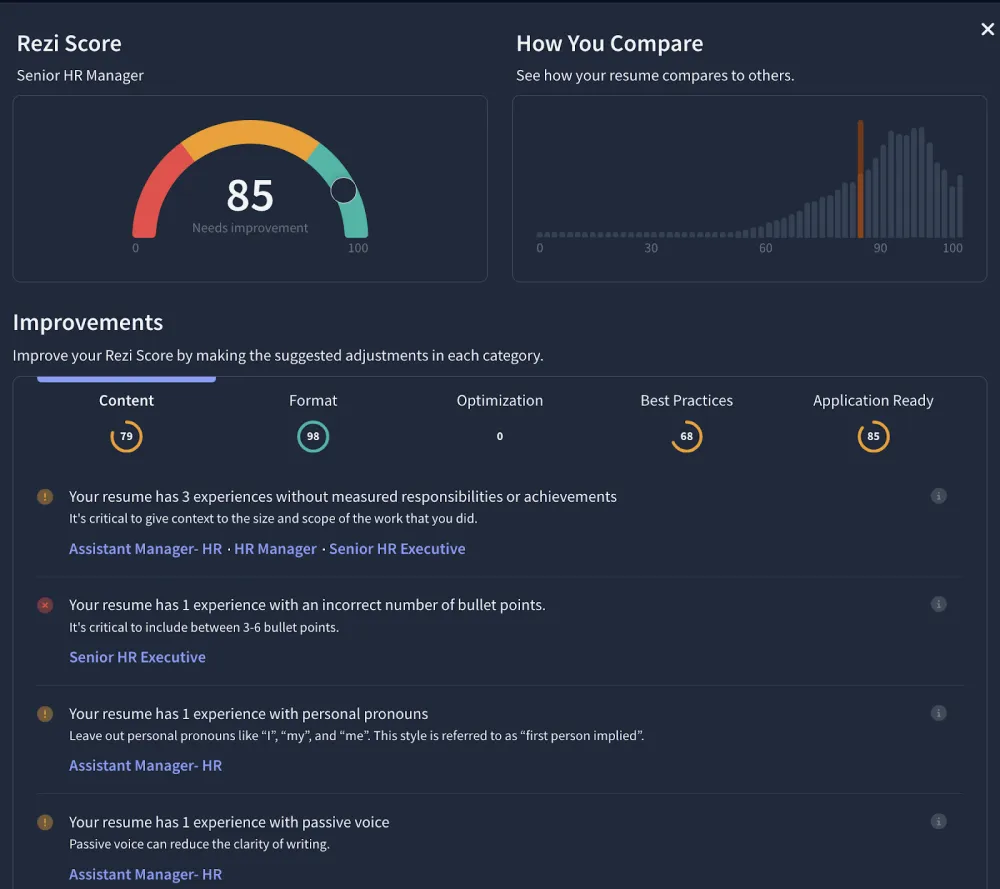
What you’re checking: does the file parse into clean sections, do the job ad’s keywords appear naturally, and is every bullet result-first with a number? Fix what’s flagged, re-run the check once, and submit. This two-minute audit is the step most chat gpt resume builder tutorials skip — and it’s the one that catches the errors that silently kill applications.
If you’re also preparing the rest of your application, our guide to the best AI cover letter tools pairs naturally with this workflow — and students building their very first resume should start with our roundup of the best free AI tools for students.
5 Mistakes That Make AI Resumes Obvious
- Letting it invent. The classic failure: ChatGPT upgrades “helped with onboarding” to “spearheaded a company-wide onboarding transformation.” Run Prompt 8. Every time.
- The summary of nothing. “Dynamic professional with a passion for excellence seeking to leverage synergies” — if your summary could sit on anyone’s resume, delete it and rerun Prompt 5 with a metric.
- Responsibilities instead of results. “Responsible for managing the team calendar” tells the recruiter nothing. “Coordinated scheduling for a 12-person team, cutting meeting conflicts 40%” tells them everything. Prompt 3 exists for this.
- Skipping the format. A brilliant ChatGPT draft pasted into a two-column Canva template with icons will still get shredded by parsers. Single column. Standard headings. Always.
- One resume for fifty jobs. The whole point of the chat gpt resume builder method is cheap tailoring. Sending the identical file everywhere wastes the advantage.
FAQs
Is there an official ChatGPT resume builder app?
No. OpenAI has never released a resume builder — ChatGPT itself is the tool, used through prompts like the eight in this guide. Third-party apps using the name are unofficial wrappers; the prompt method here is free and gives you more control.
Will recruiters know I used ChatGPT for my resume?
Only if you let the output stay generic. Recruiters flag resumes full of buzzwords, vague claims, and zero metrics — which is what lazy prompting produces. A resume built with specific prompts, real numbers, and your actual voice reads like you on your best day, not like a robot.
Can ChatGPT beat applicant tracking systems?
ChatGPT helps with the *content* ATS systems scan for — mirrored keywords, standard headings, quantified bullets. But it can’t check the *file* for parsing risks. Always pair it with an ATS audit (Prompt 8’s checklist or a free scorer like Rezi) before submitting.
Should I use ChatGPT or a dedicated AI resume builder?
Use both for different jobs. ChatGPT is the stronger *writer* — better bullets, better tailoring, better summaries. Dedicated builders like Rezi or Kickresume are stronger at *formatting and scoring*. The winning chat gpt resume builder combo: draft with ChatGPT, format and audit with a builder.
How long should my AI-written resume be?
Early career: one page. Mid-career: one to two pages. The length rule doesn’t change because AI wrote it — if anything, AI drafts run long, so ask ChatGPT to “cut this to one page, keeping only the highest-impact bullets” as a final pass.
Is it cheating to use ChatGPT on my resume?
No — it’s a writing tool, like spellcheck or a career counselor. What matters is truthfulness: every claim must be yours and verifiable. Research on AI-assisted job seekers shows algorithmic help measurably improves hiring outcomes; the line is fabrication, not assistance.
Bottom Line
A chat gpt resume builder isn’t an app you download — it’s a workflow you run: gather your facts, mine the job ad, rewrite bullets with the Problem–Action–Result formula, tailor per posting in five minutes, format single-column, and audit for ATS risks. Do that, and ChatGPT becomes the best free resume writer you’ve ever had. Skip the prompts and just ask it to “write my resume,” and you’ll get the same generic filler as everyone else. And if you’d rather put that polished resume to work freelancing instead of job-hunting, see how people are making money with AI — several of those paths start with exactly this resume.
*Pricing and free tiers checked October 2026. ChatGPT’s free tier covers every prompt in this guide; no Plus subscription needed.*
Before you submit, run your draft through an independent ATS check — Rezi’s free resume scorer is a solid option for a chat gpt resume builder workflow.
Chat GPT Resume Builder Quick-Start Checklist
Run this chat gpt resume builder checklist every time you apply. First, gather your raw work history, skills, and one target job ad — good inputs make every chat gpt resume builder session more effective. Second, run all eight chat gpt resume builder prompts in order inside a single chat so the model keeps full context. Third, move the finished draft into a clean single-column template. Fourth, close each chat gpt resume builder round with a free ATS scan before you submit.
Once you have run the full chat gpt resume builder workflow twice, each application takes under an hour — faster than rewriting from scratch and far more tailored than any fill-in template. Save your best-performing prompts in a notes app so your personal chat gpt resume builder toolkit is one paste away. Treat every application as a chance to refine your chat gpt resume builder process, and revisit your master draft every few months so the chat gpt resume builder system keeps growing with your career.
How long does the chat gpt resume builder method take?
About an hour the first time: 20 minutes gathering inputs, 30 minutes running the eight chat gpt resume builder prompts, and 10 minutes formatting plus the ATS check. Once your chat gpt resume builder prompts are saved, repeat applications take 15–20 minutes each.
One last tip: keep a “wins” file where you log every metric, compliment, and result as it happens. A running wins file makes each future chat gpt resume builder session faster, because the hardest part — remembering what you achieved — is already done. Pair that habit with this chat gpt resume builder checklist and you will never stare at a blank page again.