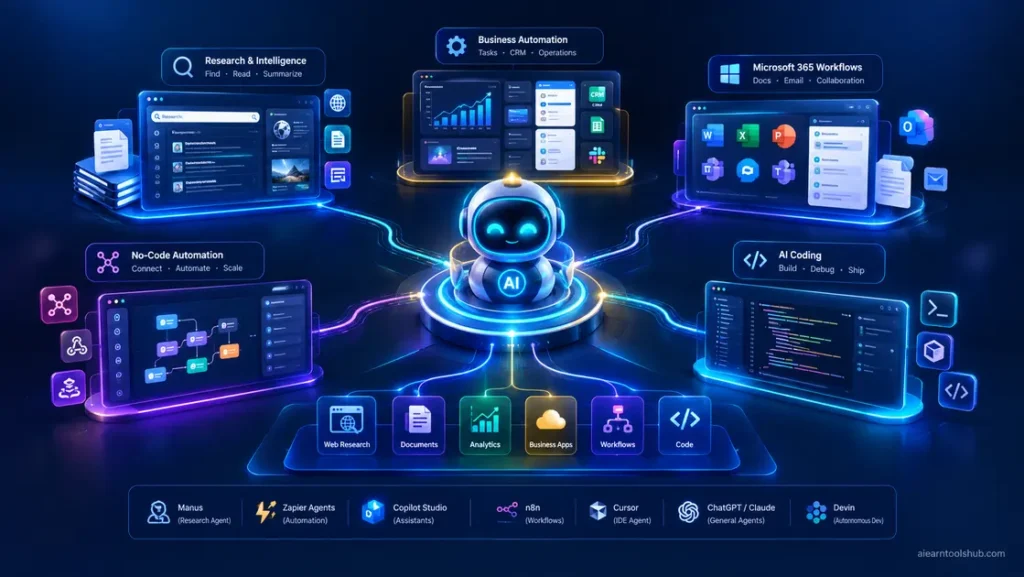
Agentic AI tools are AI systems that take a goal, plan the steps, use other software to carry them out, and adjust as they go, instead of only answering one question at a time. For most people the best starting points are Manus for hands-off projects, Zapier Agents for app workflows, Copilot Studio inside Microsoft 365, and Cursor for coding.
That sounds abstract until you picture the jobs. A freelancer in Karachi wants weekly client reports compiled without opening five tabs. A developer in London wants a bug fixed overnight. A manager in Toronto wants new leads routed and logged automatically. Agentic AI tools promise to handle all three, but they differ enormously in how much they can do alone and how much damage they can do if they get it wrong.
This guide compares seven of the most useful agentic AI tools by job, with prices, limits, and who each one suits. Not every tool marketed as agentic is equally autonomous. Some are closer to smart automation, and I say so where it matters. Prices are US list prices checked on October 8, 2026, from vendor pages and recent pricing guides, and they change often, so confirm before you pay.
Key takeaways
- Agentic AI tools differ mainly in autonomy: some act alone for hours, others follow a workflow you design.
- Many have free tiers, so you can test one safely before paying.
- Pricing is often credit-based or usage-based, which makes monthly costs harder to predict than a flat fee.
- Limit what an agent can access, and require your approval before it sends, spends, or deletes anything.
- Start with one low-risk task, not your whole workflow.
What Makes Agentic AI Tools Different From Chatbots
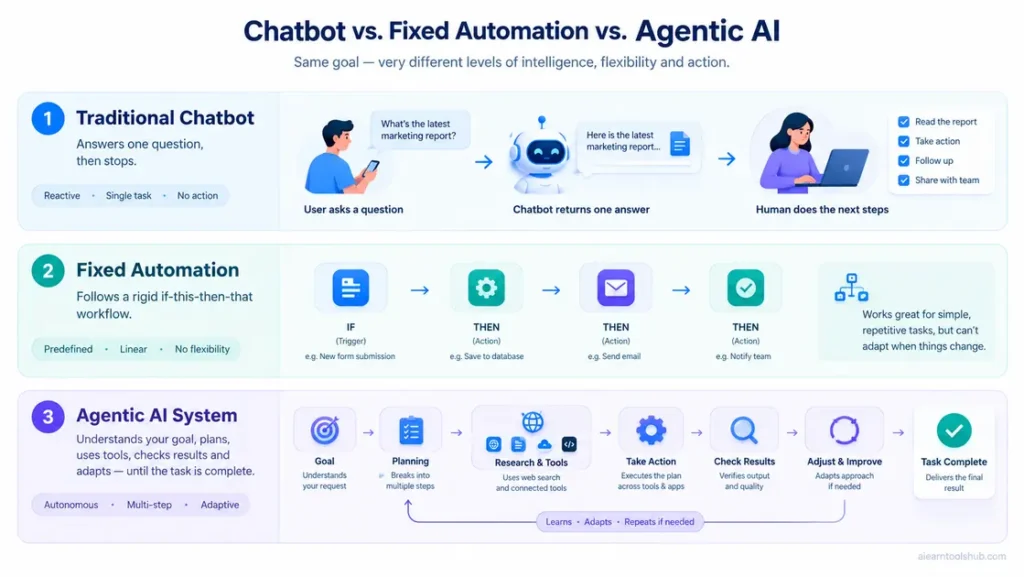
A chatbot answers one prompt and waits. An agentic tool is given a goal and works toward it across several steps, calling other apps and checking its own progress. The line between the two is blurry, which is why marketing often exaggerates it. Our explainer on AI agents vs chatbots goes deeper into the difference.
| Type | How it works | Example |
|---|---|---|
| Chatbot | Answers one prompt at a time, and you do the actions. | Asking an assistant to draft an email |
| Automation | Follows fixed if-this-then-that steps you define | A rule that logs every form submission to a sheet |
| Agentic tool | Takes a goal, plans steps, uses tools, and adapts as it goes. | An agent that researches leads, drafts outreach, and updates your CRM |
Agentic AI Tools at a Glance
| Tool | Best for | Free option | Paid from |
|---|---|---|---|
| Manus | Hands-off research and finished deliverables | Yes, daily credits | About $20 to $40 per month |
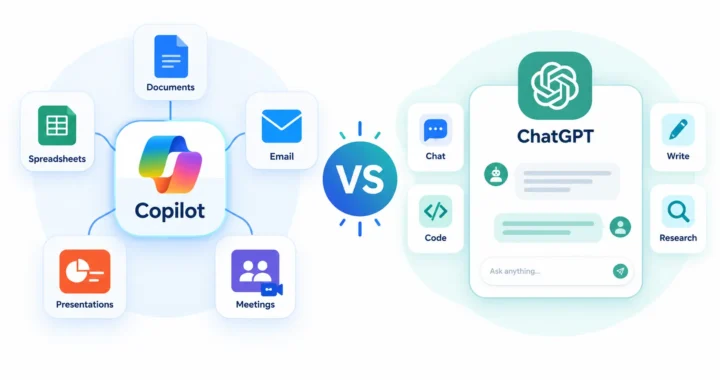
| ChatGPT and Claude agents | General tasks inside an assistant you may already use | Limited on free plans | About $20 per month (paid assistant plans) |
| Zapier Agents | Agents across thousands of apps | Yes, about 400 activities per month | Main plans from about $20 per month |
| n8n | Technical teams that want control | Free if you self-host | Cloud from about €20 to €25 per month |
| Microsoft Copilot Studio | Agents inside Microsoft 365 | Included for agents used in Microsoft 365 Copilot | $200 per month per 25,000 credits (standalone) |
| Cursor | Coding with an agent in your editor | Yes, Hobby plan. | $20 per month |
| Devin | Whole coding tickets, start to finish | Reports differ; check current plans. | Usage-based, entry plans around $20 |
Prices vary by billing period and region. Ranges come from recent pricing guides, so confirm on each vendor’s page.
7 Best Agentic AI Tools for Real Work
1. Manus: A Hands-Off Task Agent
Manus is one of the more autonomous agentic AI tools available. You give it a goal, and it plans the steps, browses the web, writes and runs code, and returns a finished deliverable such as a research report, a slide deck, or a spreadsheet. It has a free tier with daily credits, and paid plans are listed from roughly $20 to $40 per month depending on the source and billing, so check its pricing page.
Reviews raise two cautions. Reliability is still uneven for a young product, and its decisions happen inside a black box. Read the output before acting on it, and do not hand it anything high-stakes without supervision. It suits solo operators who want a solid first draft of a research project without doing every step themselves.
2. ChatGPT and Claude: Agents Inside Assistants You Already Use
The assistants many people already pay for now include agent features. ChatGPT offers an agent mode and the Codex coding agent on paid plans, with usage limits that rise on higher tiers. Anthropic offers Claude Code, a coding agent that works from the command line, and Cowork, a desktop app for delegating knowledge-work tasks. Plan names and allowances change often, so check each company’s pricing page, such as OpenAI’s pricing page.
The advantage is that you add no new vendor. The trade-off is that these agents work mostly with the files and apps you connect, so they are less of a ready-made “run my business apps” tool than Zapier or Copilot Studio. Clear instructions matter a lot here, and our guide to how to write AI prompts helps. For plan details, see our comparison of Microsoft Copilot vs ChatGPT.
3. Zapier Agents: Agents Across Your Apps
Zapier Agents takes a goal and works across your connected apps. Zapier’s biggest strength is breadth: its integration library runs to thousands of apps, so an obscure tool probably already connects. Zapier Agents has a free tier of about 400 activities per month, and the main Zapier platform starts around $19.99 per month, with agent limits that scale by plan.
Because it works through connected tools and instructions you set, it sits closer to smart automation than to a fully independent agent. For most small teams that is a plus, since the behavior is more predictable. It is a good first step if you already run automations.
4. n8n: Control for Technical Teams
n8n is a workflow tool with a built-in AI agent node. You can self-host it, which keeps costs low at high volume, or use its cloud plans from roughly €20 to €25 per month. It gives engineers real control over each step, and it takes more technical comfort than Zapier to get the most from it. If nobody on your team is comfortable with APIs, skip it.
5. Microsoft Copilot Studio: Agents Inside Microsoft 365
Copilot Studio is Microsoft’s low-code platform for building agents that live in Teams, Microsoft 365 Copilot or a website. For organizations already on Microsoft 365 it removes friction because sign-in and governance are already in place. Microsoft says usage of agents published to Microsoft 365 Copilot is included for licensed users, and standalone capacity is sold in credit packs listed at around $200 per month for 25,000 credits.
See the official Copilot Studio page for current terms and our Microsoft AI tool guide for how it compares with Microsoft Foundry. If your company does not use Microsoft 365, other tools here will fit better.
6. Cursor and Other Coding Agents
Cursor is an AI code editor with an agent mode that can make changes across a whole codebase. It has a free Hobby plan and a Pro plan at $20 per month. GitHub Copilot is the other mainstream choice, with a free plan and paid plans from $10 per month listed on GitHub’s individual plans page, and Claude Code is the terminal-based option mentioned above.
Whichever you pick, work on a separate branch so you can review or discard what the agent changes. Never merge agent code you have not read.
7. Devin: An Autonomous Software Engineer
Devin, from Cognition, is built to behave like an autonomous software engineer. It works in its own sandboxed environment with an editor and shell, takes a whole ticket and returns a pull request. Entry plans are reported at around $20 per month with usage-based charges on top, and reports differ on whether a free plan exists, so check current pricing.
It works best on well-scoped tasks in projects with good test coverage. If your codebase has few tests, you will spend your time savings on review.
How Much Autonomy Do You Need?
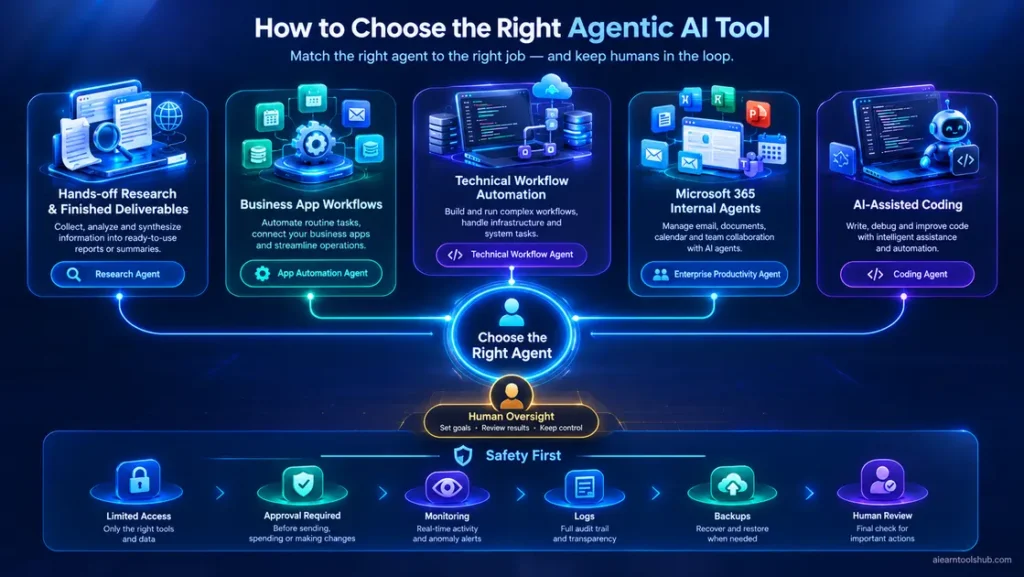
Choose by the control you want, not by the loudest marketing claim.
| If you want to… | Start with |
|---|---|
| Hand off a research project and get a finished file. | Manus |
| Automate workflows across many business apps. | Zapier Agents |
| Keep full control with technical staff. | n8n |
| Build internal agents inside Microsoft 365 | Copilot Studio |
| Watch an agent edit code in your editor. | Cursor, GitHub Copilot, or Claude Code |
| Delegate whole coding tickets. | Devin |
| Try agents without another subscription. | Agent features in ChatGPT or Claude |
What Agentic AI Tools Really Cost: Credits and Usage Pricing
Agentic AI tools rarely charge one flat fee for everything. Common models include per-seat plans, credits, “activities,” and compute units. Each action an agent takes may use credits, and an agent that loops or retries can burn through them faster than you expect.
Copilot Studio’s standalone pack, listed at about $200 per month for 25,000 credits, shows why you should estimate before you scale. A few practical rules:
- Start on free tiers and measure real use for a week.
- Set usage alerts or spending caps wherever the vendor offers them.
- Estimate how many agent actions one task needs before you multiply by volume.
- Compare the monthly cost with the hours the agent actually saves you after review.
Safety Rules for Agentic AI Tools
Agentic AI tools can act, which means they can also make mistakes at speed. A chatbot’s wrong answer costs you a minute. An agent’s wrong action can send an email, overwrite a file or spend money.
- Give the least access that works. Connect only the apps and folders the task needs, and use a test account first.
- Require approval for risky actions. Sending messages, spending money, and deleting and publishing should wait for your yes.
- Watch for prompt injection. Web pages and documents can hide instructions that try to hijack an agent, so keep agents away from untrusted sites when they can reach sensitive accounts.
- Keep a trail. Review the agent’s logs, and use version control or backups for anything it edits.
- Check data policies. Read each vendor’s rules on how your data is stored and used.
Run a 7-Day Pilot Before You Commit
The safest way to adopt agentic AI tools is a small, measured trial.
- Pick one repetitive, low-risk task, such as compiling a weekly report or sorting incoming leads.
- Choose one tool from the list, on its free tier.
- Write a clear goal with limits, using the template below.
- Review every output for a week, and note the minutes saved and the mistakes caught.
Goal: [what you want done].
Allowed tools: [apps or sites it may use].
Not allowed: sending messages, spending money or deleting anything without my approval.
Output: [format you want].
If you are unsure about anything, stop and ask me.
Common Mistakes to Avoid
Most failures with agentic AI tools trace back to a few habits.
- Granting too much access too early. Start narrow and widen only after the agent earns trust.
- Judging by demo videos. Demos use clean data and ideal tasks. Your workflow is messier.
- Skipping review. Even good agents misread instructions and invent details.
- Buying credits before measuring. Usage pricing punishes guesses.
- Automating an unclear process. An agent cannot fix a workflow nobody has defined.
Bottom Line: Which Agentic AI Tools to Start With
For most people, the right first step with agentic AI tools is a free tier and one small task. Pick Manus for research handoffs, Zapier Agents if you already run app automations, Copilot Studio if your company lives in Microsoft 365, and Cursor or GitHub Copilot if you write code.
Keep a human in the loop until a tool has proven itself on your own work. The best agent is the one that saves you time after you have checked its output.
Agentic AI Tools: Frequently Asked Questions
What are agentic AI tools?
Agentic AI tools are AI systems that take a goal, plan the steps, use other software to carry them out and adjust as they go, instead of only answering one prompt at a time. Examples include Manus, Zapier Agents, Copilot Studio and coding agents like Cursor and Devin.
What is the difference between agentic AI and generative AI?
Generative AI creates content such as text or images from a prompt. Agentic AI uses that ability to pursue a goal across multiple steps, calling tools and taking actions along the way. Most agentic tools are built on generative models, so the two overlap rather than compete.
What is the best free agentic AI tool?
It depends on the job. Manus has a free tier with daily credits for research projects, Zapier Agents offers about 400 free activities a month for app workflows, Cursor’s Hobby plan and GitHub Copilot’s free plan cover coding, and n8n is free to self-host if you have technical skills.
Are agentic AI tools safe to use?
They can be, if you limit what they can access. Give them only the permissions they need, require approval before they send, spend or delete anything, test on low-risk tasks, and watch for prompt injection from untrusted web pages. Review their output before acting on it.
Do I need coding skills to use agentic AI tools?
No. Manus, Zapier Agents and Copilot Studio are built for non-developers, and ChatGPT or Claude agent features work from plain-language instructions. Coding agents such as Cursor and Devin, and workflow tools like n8n, are more useful if you can read code or APIs.