
Microsoft Copilot vs ChatGPT: 7 Differences & Best Pick
Last checked: October 2026
Microsoft Copilot vs ChatGPT comes down to where you work. Choose Copilot if your day lives in Word, Excel, Outlook, and Teams and you want AI that can use your work files. Choose ChatGPT if you want a standalone assistant with more model choice, custom GPTs, and built-in coding tools.
For plain chat, Microsoft Copilot vs ChatGPT is closer than the marketing suggests. Both have leaned heavily on OpenAI’s models, so a quick question often gets a similar answer. The real differences sit around the model: where the tool lives, what data it can reach, what it costs, and who controls it.
A student in Lahore, a freelancer in Karachi, an analyst in Toronto, and a developer in London would each pick differently, and each would be right. This Microsoft Copilot vs ChatGPT guide shows you the seven differences that matter, then matches them to who you are. Prices are US list prices checked on October 7, 2026, and model names change every few months, so I compare capabilities instead of version numbers.
Key takeaways
- Microsoft Copilot vs ChatGPT is a comparison of two different products from different companies, even where they share underlying models.
- Copilot’s edge is integration with Microsoft 365 and your work data. ChatGPT’s edge is flexibility as a standalone tool.
- The common paid entry points cost about the same: ChatGPT Plus is $20 per month, and Microsoft 365 Premium is $19.99.
- Both have free plans, so you can test them side by side before paying.
- Many people end up using both for different jobs.
Is Microsoft Copilot the Same as ChatGPT?
No. ChatGPT is OpenAI’s own product, and it runs OpenAI’s models. Microsoft Copilot is Microsoft’s assistant, built into Windows, Edge, the web, and the Office apps. Microsoft has leaned on OpenAI’s models for Copilot, but it now also offers Anthropic’s Claude models in some work plans and uses its own models in places.
So in the Microsoft Copilot vs ChatGPT question, the honest answer is “related, not identical.” If you only ask general questions, you may struggle to tell them apart. Once you add your files, your email, and your admin settings, they behave very differently.
Microsoft Copilot vs ChatGPT: 7 Key Differences
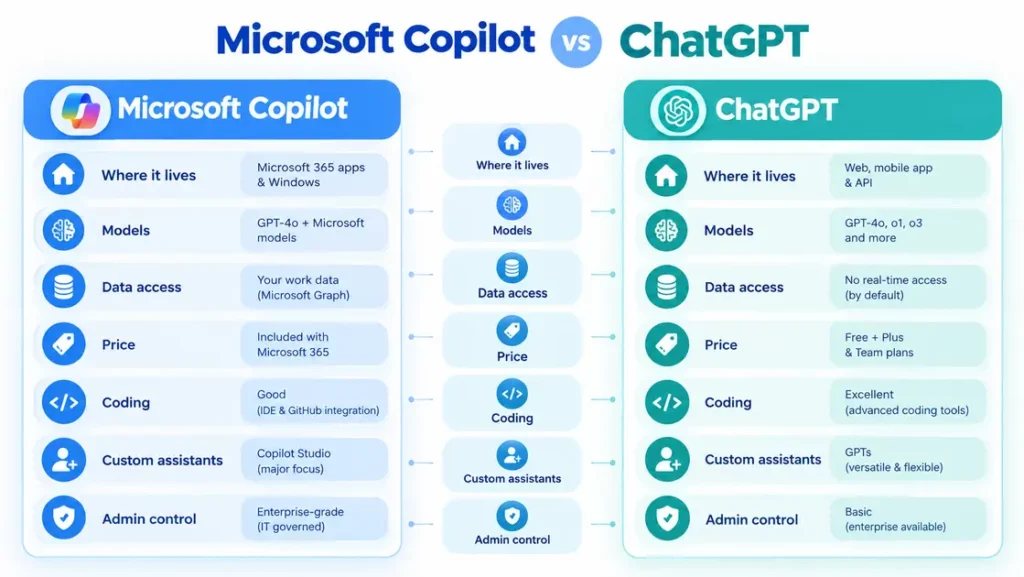
The short answer is that Microsoft Copilot vs ChatGPT differ most in where they live and what they can see. Copilot is built into Windows, Edge, and Microsoft 365 apps, while ChatGPT is a standalone assistant you visit. The table below sums up the seven differences that matter most in daily use.
| Area | Microsoft Copilot | ChatGPT |
|---|---|---|
| Where it lives | Windows, Edge, web, and Office apps | Web, desktop, and mobile apps, API |
| Models | OpenAI plus other vendors, and Microsoft’s own | OpenAI models |
| Your data | Work email, files, and meetings (paid work plan) | What you upload or connect |
| Price entry point | Free, then $19.99 (Premium) | Free, then $20 (plus) |
| Coding | GitHub Copilot (separate product) | Codex on paid plans |
| Custom tools | Copilot Studio agents | Custom GPTs |
| Admin control | Microsoft 365 admin center | Business and enterprise plans |
1. Where each one lives
Copilot is spread through the Microsoft world. You meet it in Windows, in the Edge browser, on the web, and, with the right plan, inside Word, Excel, PowerPoint, Outlook, and Teams. You do not go to it so much as it shows up where you already are.
ChatGPT is a destination. You open the app or website, work there, and move results elsewhere. That feels simpler at first and clunkier when you do the same task all day inside Office files.
2. The models underneath
ChatGPT runs OpenAI’s lineup, and OpenAI usually ships new models there first. Copilot mostly runs OpenAI’s models too, but Microsoft decides which model handles a task, and it has added other vendors’ models in some plans.
The trade-off is visibility. ChatGPT often lets you pick the model yourself. Copilot more often routes for you, which is easier to use but gives you less control.
3. Access to your own data
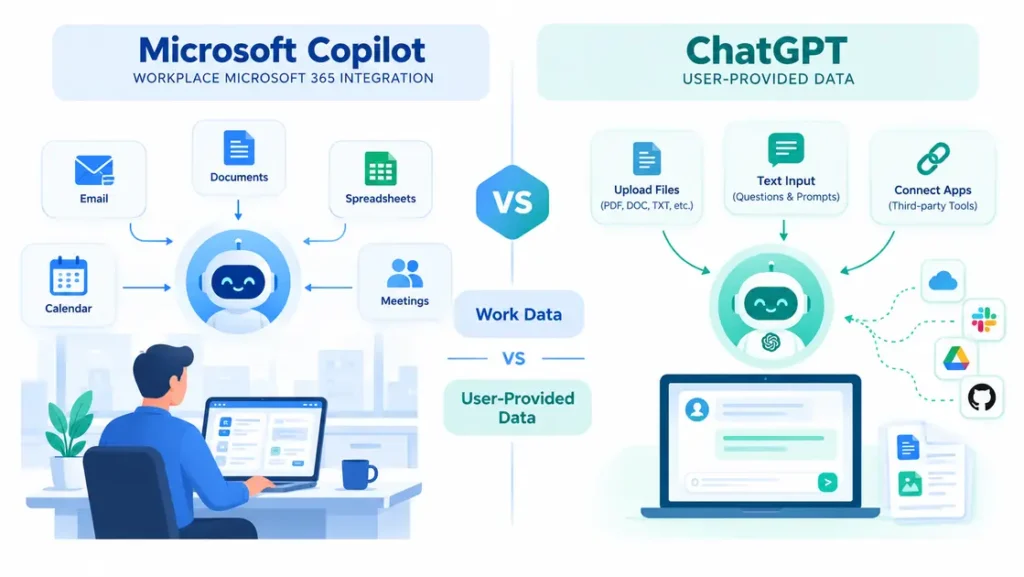
This is the biggest practical gap. The paid work version, Microsoft 365 Copilot, can draw on your organization’s email, files, and meetings through Microsoft’s data layer. It can summarize a thread you missed or draft a reply in context.
ChatGPT starts blank. You paste text, upload files, or connect apps, and it works with what you give it. That is more flexible, but you do the feeding. Our Microsoft AI tool guide explains which Copilot versions can see work data and which cannot.
4. Price
In the Microsoft Copilot vs ChatGPT price comparison, both have a free plan, and both charge about $20 for the standard paid tier. The details differ, so compare what each price includes.
| Tier | Microsoft | ChatGPT |
|---|---|---|
| Free | Copilot app, $0, with usage limits | $0, with ads in some markets |
| Budget | No direct match | Go, about $8 per month in the US, priced by region |
| Standard | Microsoft 365 Premium, $19.99 per month | Plus, $20 per month |
| Power user | Higher Microsoft 365 tier | Pro, from $100 per month |
| Work (per user) | Microsoft 365 Copilot, $30, plus a base licence | Business, $20 billed annually or $25 monthly |
Microsoft 365 Premium is not only an AI plan. It also bundles the Office apps and cloud storage, so you are paying for more than a chatbot. ChatGPT Plus is the AI alone. Check OpenAI’s pricing page and Microsoft’s own page before buying, because both companies change plans often and regional prices differ in Pakistan, the UK, and Canada.
5. Coding
Microsoft’s coding assistant is GitHub Copilot, which is a separate product with its own plans. It has a free tier and paid plans from $10 per month. ChatGPT includes Codex, its coding agent, on paid plans, with usage that scales by tier.
Neither is a clear winner for every developer. Many use an editor assistant for inline suggestions and a chat tool for bigger questions.
6. Custom assistants
ChatGPT lets you build custom GPTs, which are tuned chat assistants you can reuse or share. Microsoft’s route is Copilot Studio, a low-code platform for building agents that publish to Teams, Microsoft 365 Copilot, or a website. See the official Copilot Studio page for what it can do.
If the word “agent” is new to you, our guide to AI agents vs chatbots explains the difference. A custom GPT is easier for an individual. Copilot Studio is built for organizations with Microsoft accounts and shared data.
7. Privacy and admin control
Under commercial licenses, Microsoft states that prompts and responses stay within your organization’s tenant and are not used to train its foundation models. IT admins manage Copilot through the Microsoft 365 admin tools.
ChatGPT’s business and enterprise plans also offer admin controls. The risk is the consumer app. Pasting client files into a personal account of either tool can break company rules. Use whichever tool your employer has approved, and read the current data terms yourself before sharing sensitive material.
Microsoft Copilot vs ChatGPT: Which One Should You Choose?
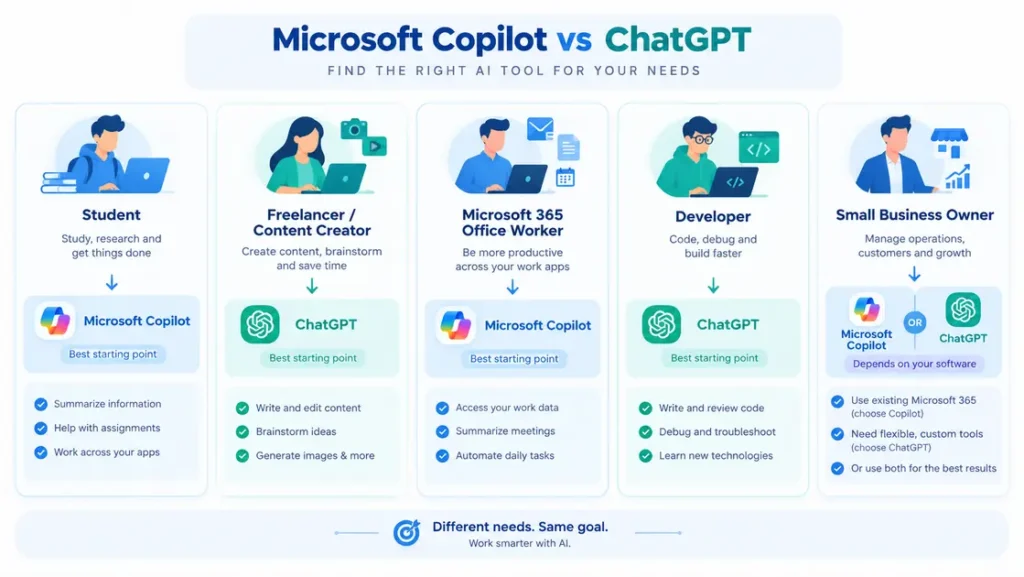
Choose Microsoft Copilot if your job runs on Word, Excel, Outlook, and Teams, and choose ChatGPT if you want one flexible assistant for writing, research, and coding. That is the Microsoft Copilot vs ChatGPT decision in one line, and the table below breaks it down by user type.
Here is how the Microsoft Copilot vs ChatGPT choice plays out for the most common types of users.
| If you are… | Start with | Why |
|---|---|---|
| A student on a tight budget | Both free plans | Test each on real coursework before paying. See our list of the best AI tools for students. |
| A freelancer or content creator | ChatGPT | Flexible model choice and custom GPTs suit varied client work. Our guide to using ChatGPT for making money online shows practical ideas. |
| An office worker in Microsoft 365 | Copilot | It works inside the apps you already use all day. |
| A developer | Try GitHub Copilot and ChatGPT. | They solve different parts of the coding workflow. |
| A small business owner | Whichever matches your software | Microsoft 365 shops lean Copilot. Mixed-tool teams often prefer ChatGPT. See AI tools for business. |
How Can You Test Microsoft Copilot vs ChatGPT Yourself?
You can test Microsoft Copilot vs ChatGPT in about ten minutes, and it costs nothing. Give both free apps the same real task from your own work, then judge the answers side by side. Your own results will tell you more than any review, including this one.
Do not take any comparison’s word for it, this one included. Open both free apps and paste the same prompt into each:
Write a polite 120-word email asking a client for a payment update. Then list two risks in the wording.Then judge four things. Is the tone right for your client? Did it follow the word limit? Were the two risks actually useful? How did it handle a follow-up like “make it firmer”? Ten minutes of this tells you more than any feature list. If your prompts feel weak, our guide to how to write AI prompts will help.
What Are the Biggest Microsoft Copilot vs ChatGPT Mistakes to Avoid?
The biggest mistakes are assuming the two tools are the same, judging them by model names, and paying before you test. Avoid those three, and the Microsoft Copilot vs ChatGPT choice becomes much simpler. The list below explains each mistake and how to dodge it.
Most wrong turns in the Microsoft Copilot vs ChatGPT decision come from a few predictable assumptions.
- Assuming they are identical. They share some models, not features, data access, or controls.
- Judging by model names. Names change every few months. Judge by the job each tool does for you.
- Paying before testing. Both free plans are enough to see which style you prefer.
- Using a personal account for work files. Stick to the tool your employer approves.
Which Is Better for Students, Office Workers, Coders, and Businesses?
For students, the Microsoft Copilot vs ChatGPT verdict is a tie on the free plans, so start with both and keep the one that explains topics in a way you understand. Students who already get Microsoft 365 through their school may find Copilot more convenient, because it sits inside Word and PowerPoint.
Office workers get the clearest win from Copilot when their company uses Microsoft 365, because it can draft from real emails, documents, and meetings. ChatGPT suits office workers whose files live outside Microsoft apps, or who switch between many different tools during the day.
For coders, the Microsoft Copilot vs ChatGPT split is about where the help appears. GitHub Copilot assists inside your editor as you type, while ChatGPT is better for explaining errors, planning features, and reviewing longer pieces of code away from the editor.
Businesses should decide by software and control, not by chatbot quality alone. A company standardized on Microsoft 365 usually gets more from Copilot and its admin controls, while a company with mixed tools often prefers ChatGPT for its flexibility across teams.
Can You Use Microsoft Copilot and ChatGPT Together?
Yes, and using both is often the smartest Microsoft Copilot vs ChatGPT answer of all. Run Copilot for documents, email, and meetings inside Microsoft 365, and open ChatGPT for research, brainstorming, and coding help. Many people keep both free plans and pay for only one.
Keep one simple rule when you split the work in a Microsoft Copilot vs ChatGPT setup: never paste the same private file into both tools, and follow your employer policy for company data. Start jobs in the tool that already holds your files, and move only the finished draft across, not the raw material.
One difference is still coming: ChatGPT is adding ads on its Free and Go plans — read how ChatGPT ads will work in 2026.
What Is the Bottom Line on Microsoft Copilot vs ChatGPT?
In the end, Microsoft Copilot vs ChatGPT is a question about your workflow, not about which AI is smarter. If you spend your day inside Microsoft 365, Copilot is the natural fit, because it reaches your files and apps. If you want a flexible assistant for research, writing, and coding that works anywhere, ChatGPT is the safer default.
For most individuals, the smart move is to try both free plans for a week and pay for one only when you keep hitting its limits. For teams, pick the tool that matches the software you already own and pilot it with a small group first.
Microsoft Copilot vs ChatGPT: Frequently Asked Questions
Short answers to the questions readers ask most about Microsoft Copilot vs ChatGPT are below. Each answer matches the detail in the sections above, so you can scan this part first and read the full comparison after.
Does Microsoft Copilot use ChatGPT?
Microsoft Copilot has run mainly on OpenAI’s GPT models, the company behind ChatGPT, but it is a separate product built by Microsoft. It now also uses other models, including Anthropic’s Claude in some work plans, so the two are no longer identical underneath.
Is Microsoft Copilot better than ChatGPT?
Neither wins everywhere. Copilot is better when your work lives in Microsoft 365 and you want AI that can use your emails and files. ChatGPT is better as a standalone assistant with more model choice, custom GPTs, and coding tools. For plain chat, the difference is small.
Which is cheaper, Microsoft Copilot or ChatGPT?
Both start free. ChatGPT Plus costs $20 per month, and Microsoft 365 Premium costs $19.99 per month while also bundling Office apps and storage. For work, Microsoft 365 Copilot adds $30 per user per month on top of a base license.
Which is better for coding, Copilot or ChatGPT?
For code inside an editor, GitHub Copilot is Microsoft’s option, with a free plan and paid plans from $10 per month. ChatGPT includes Codex on paid plans. Many developers use both, so test each on your own project before paying.
Can you use Microsoft Copilot and ChatGPT together?
Yes. They are separate products, so you can use both. A common split is Copilot for work documents and email inside Microsoft 365, and ChatGPT for research, brainstorming and coding help. Keep confidential company files in whichever tool your employer approves.
- Free Unit Converter: 7 Best Tools to Convert Anything (2026)
- AI Note Taker: 7 Best Free Tools for Notes & Summaries (2026)
- AI Book Generator: 7 Best Free Tools to Write a Full Book (2026)
- AI Prompt Generator: 7 Best Free Tools That Work (2026)
- How to Remove Background from Video Free: AI Tools That Do It in Seconds (2026)





[…] by where you work, not by hype. Microsoft 365 users should look at Copilot, and our comparison of Microsoft Copilot vs ChatGPT explains the trade-offs. For a no-cost start, see our list of free AI tools like ChatGPT without […]
[…] Ads appeared on Free and Go in the US in early 2026, and recent guides report that they have spread to many more countries, so check whether you see them. Prices differ by country, so confirm on OpenAI’s pricing page. For a deeper look at how it compares with Microsoft’s assistant, see our guide to Microsoft Copilot vs ChatGPT. […]
[…] is not your only option — see how it compares in our Microsoft Copilot vs ChatGPT breakdown before you pick your main […]